> For the complete documentation index, see [llms.txt](https://helps.ptengine.com/llms.txt). Markdown versions of documentation pages are available by appending `.md` to page URLs; this page is available as [Markdown](https://helps.ptengine.com/cn/experience/user-group/create-segment.md).
# 用户组的创建方法
用户组就是按条件圈出来的一批人。圈好之后,既能单独看这批人的报告,也能把体验只投给他们。
建法有两种:**套模板**(三个现成的)或**自己定条件**。
***
## 开始之前
* 用户组**建完才开始积累数据**,报告里看不到建之前的历史
* 想按事件圈人,事件得**先设好且已被触发过**,否则条件里选不到
* 想按会员 ID、客单价这类自家数据圈人,先做 [用户识别标签](/cn/experience/setting/user-id-tag-setup.md)
***
## 入口
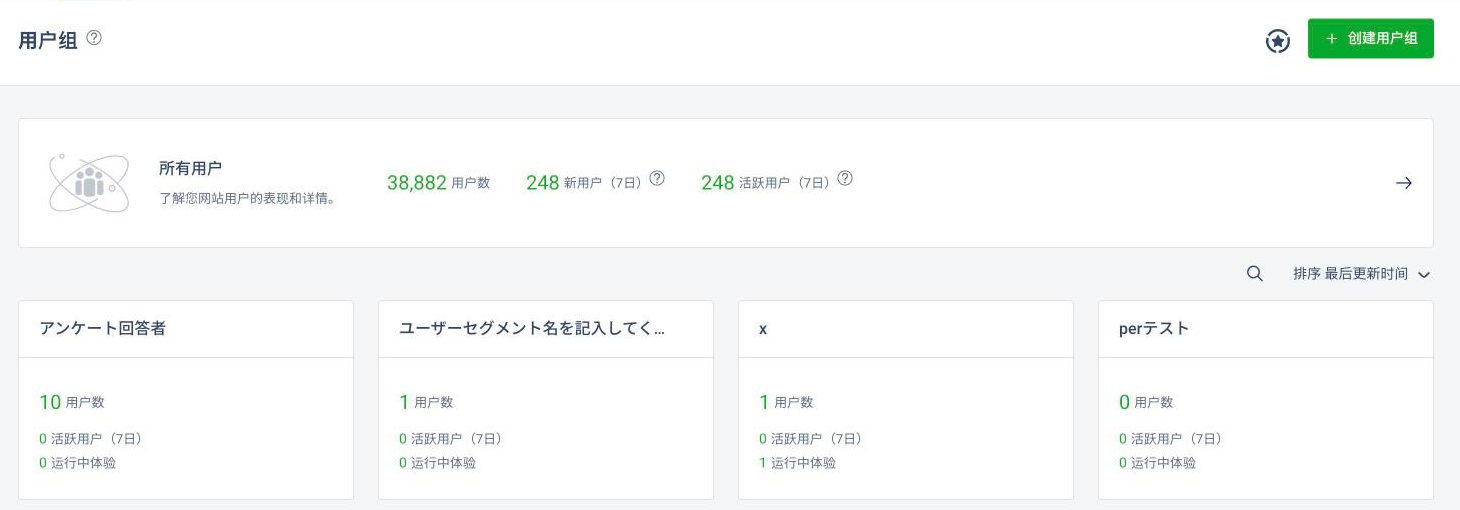
Experience →**用户**标签页。右上角两个按钮:
* **⭐(星形图标)** — 展开推荐模板
* **+ 创建用户组** — 直接自己建
 {% hint style="info" %}
两个按钮都在**右上角**。页面中间那张“所有用户”卡片是整体概况,不是建组入口。
{% endhint %}
***
## 方式一:套模板
点 ⭐ 展开推荐面板,里面是三个模板加一个“您自己的用户组”:
{% hint style="info" %}
两个按钮都在**右上角**。页面中间那张“所有用户”卡片是整体概况,不是建组入口。
{% endhint %}
***
## 方式一:套模板
点 ⭐ 展开推荐面板,里面是三个模板加一个“您自己的用户组”:
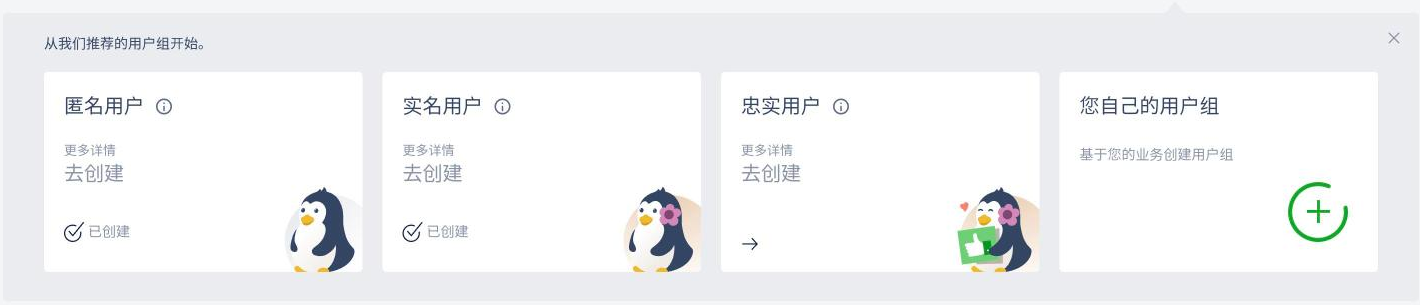 | 模板 | 圈的是谁 | 拿来干什么 |
| -------- | ------------------------ | ----------------------- |
| **匿名用户** | 还没完成主要转化的人——没注册、没咨询、没预约 | 按他们的来源和浏览历史,针对性地讲清楚产品价值 |
| **实名用户** | 已经达成基本业务目标的人——登录过、买过、咨询过 | 基于用户属性和行为做增值推荐,往长期关系上走 |
| **忠实用户** | 对产品评价高的人 | 发专属邀请、收反馈、推口碑 |
每张卡片上有**更多详情**(看这个模板的条件定义)和**去创建**。已经建过的会显示**已创建**。
***
## 方式二:自己定条件
{% stepper %}
{% step %}
### 点“+ 创建用户组”
也可以从推荐面板最右边的“您自己的用户组”进。
{% endstep %}
{% step %}
### 给它起名
默认是“未命名用户组”,改掉。下面的 **+描述** 点开可以写备注给同事看。
| 模板 | 圈的是谁 | 拿来干什么 |
| -------- | ------------------------ | ----------------------- |
| **匿名用户** | 还没完成主要转化的人——没注册、没咨询、没预约 | 按他们的来源和浏览历史,针对性地讲清楚产品价值 |
| **实名用户** | 已经达成基本业务目标的人——登录过、买过、咨询过 | 基于用户属性和行为做增值推荐,往长期关系上走 |
| **忠实用户** | 对产品评价高的人 | 发专属邀请、收反馈、推口碑 |
每张卡片上有**更多详情**(看这个模板的条件定义)和**去创建**。已经建过的会显示**已创建**。
***
## 方式二:自己定条件
{% stepper %}
{% step %}
### 点“+ 创建用户组”
也可以从推荐面板最右边的“您自己的用户组”进。
{% endstep %}
{% step %}
### 给它起名
默认是“未命名用户组”,改掉。下面的 **+描述** 点开可以写备注给同事看。
 {% endstep %}
{% step %}
### 加条件
绿色那条显示当前**全部用户**和**活跃用户**(7日)的人数,是你筛选前的基数。下面的下拉选条件,条件分三组:
{% endstep %}
{% step %}
### 加条件
绿色那条显示当前**全部用户**和**活跃用户**(7日)的人数,是你筛选前的基数。下面的下拉选条件,条件分三组:
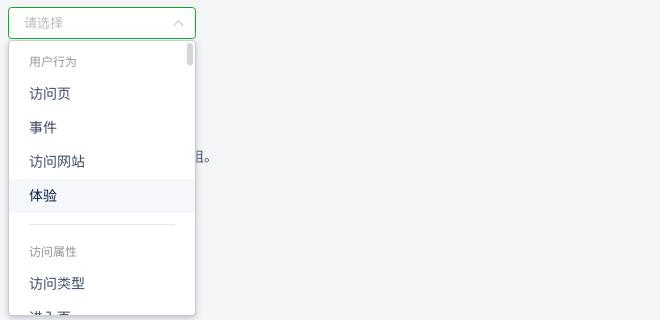 | 条件组 | 里面有什么 |
| -------- | ------------------------------------------------------------------------------- |
| **用户行为** | 访问页、事件、访问网站、体验 |
| **访问属性** | 访问类型、进入页、来源类型、URL 来源、来源主机、广告名称 / 来源 / 媒介 / 关键词 / 内容、浏览器、浏览器版本、分辨率、品牌、国家/区域、州/城市 |
| **用户属性** | 通过用户识别标签传进来的自家数据 |
要多个条件就点 **+ 添加条件** 继续加。
{% endstep %}
{% step %}
### 看预览人数,然后保存
条件定好后页面下方会算出这组有多少人。**没定条件时“保存用户组”是灰的**,点不动。
人数对了再点右上角**保存用户组**。
{% endstep %}
{% endstepper %}
***
## 几个常用的圈法
| 想圈谁 | 怎么定 |
| ------- | ------------------------- |
| 高频访问用户 | 过去 30 天内访问某页 5 次以上 |
| 购物车放弃用户 | 触发了“加入购物车”事件、但没触发“购买完成”事件 |
| 季节商品关注层 | 浏览过特定季节商品页 |
{% hint style="warning" %}
按事件圈人的前提是**事件已经设好且被触发过**。刚写完埋点还没人触发的事件,条件里选不到。
{% endhint %}
***
## 建组时容易翻车的地方
* **条件太细,人数太少。** 保存前看一眼预览人数,个位数的组做不出有意义的分析
* **几个组互相重叠或打架。** 同一个人同时落进好几个组,之后看报告会对不上
* **先想清楚要拿这组人干什么**再建——是看报告,还是投体验,决定了条件该怎么写
***
## 做完之后
* 用户组**创建后才开始积累数据**,报告里看不到创建之前的历史
* 条件写法不确定 → [用户组详细配置指南](/cn/experience/user-group/segment-advanced.md)、[用户组的筛选条件说明](/cn/faq/experience-edit/filter-conditions.md)
* 建好之后去 [用户组报告](/cn/experience/user-group/segment-report.md) 看这组人有多少、是什么样
***
## 相关页面
* [用户组](/cn/experience/user-group.md) — 匿名用户与已识别用户的区别
* [用户识别标签的设置方法](/cn/experience/setting/user-id-tag-setup.md) — 想按会员 ID、客单价圈人
* [体验条件的设置](/cn/experience/campaign/delivery-conditions.md) — 把用户组用作投放对象
| 条件组 | 里面有什么 |
| -------- | ------------------------------------------------------------------------------- |
| **用户行为** | 访问页、事件、访问网站、体验 |
| **访问属性** | 访问类型、进入页、来源类型、URL 来源、来源主机、广告名称 / 来源 / 媒介 / 关键词 / 内容、浏览器、浏览器版本、分辨率、品牌、国家/区域、州/城市 |
| **用户属性** | 通过用户识别标签传进来的自家数据 |
要多个条件就点 **+ 添加条件** 继续加。
{% endstep %}
{% step %}
### 看预览人数,然后保存
条件定好后页面下方会算出这组有多少人。**没定条件时“保存用户组”是灰的**,点不动。
人数对了再点右上角**保存用户组**。
{% endstep %}
{% endstepper %}
***
## 几个常用的圈法
| 想圈谁 | 怎么定 |
| ------- | ------------------------- |
| 高频访问用户 | 过去 30 天内访问某页 5 次以上 |
| 购物车放弃用户 | 触发了“加入购物车”事件、但没触发“购买完成”事件 |
| 季节商品关注层 | 浏览过特定季节商品页 |
{% hint style="warning" %}
按事件圈人的前提是**事件已经设好且被触发过**。刚写完埋点还没人触发的事件,条件里选不到。
{% endhint %}
***
## 建组时容易翻车的地方
* **条件太细,人数太少。** 保存前看一眼预览人数,个位数的组做不出有意义的分析
* **几个组互相重叠或打架。** 同一个人同时落进好几个组,之后看报告会对不上
* **先想清楚要拿这组人干什么**再建——是看报告,还是投体验,决定了条件该怎么写
***
## 做完之后
* 用户组**创建后才开始积累数据**,报告里看不到创建之前的历史
* 条件写法不确定 → [用户组详细配置指南](/cn/experience/user-group/segment-advanced.md)、[用户组的筛选条件说明](/cn/faq/experience-edit/filter-conditions.md)
* 建好之后去 [用户组报告](/cn/experience/user-group/segment-report.md) 看这组人有多少、是什么样
***
## 相关页面
* [用户组](/cn/experience/user-group.md) — 匿名用户与已识别用户的区别
* [用户识别标签的设置方法](/cn/experience/setting/user-id-tag-setup.md) — 想按会员 ID、客单价圈人
* [体验条件的设置](/cn/experience/campaign/delivery-conditions.md) — 把用户组用作投放对象