# 监测代码对页面加载速度的影响

### 您是否有以下的困惑？ <a href="#nin-shi-fou-you-yi-xia-de-kun-huo" id="nin-shi-fou-you-yi-xia-de-kun-huo"></a>

您是否在担心Ptengine的监测代码来监测页面时，页面的加载速度是否会受到影响呢？

那么请放心，Ptengine的监测代码对于页面加载速度的影响非常小，甚至可以认为是没有影响的（具体影响范围可能会受到访问者的网络环境等因素的影响，请您提前了解并理解）。

接下来，我们将介绍如何判断基本标签对页面加载速度的影响范围。

### 检测方法 <a href="#jian-ce-fang-fa" id="jian-ce-fang-fa"></a>

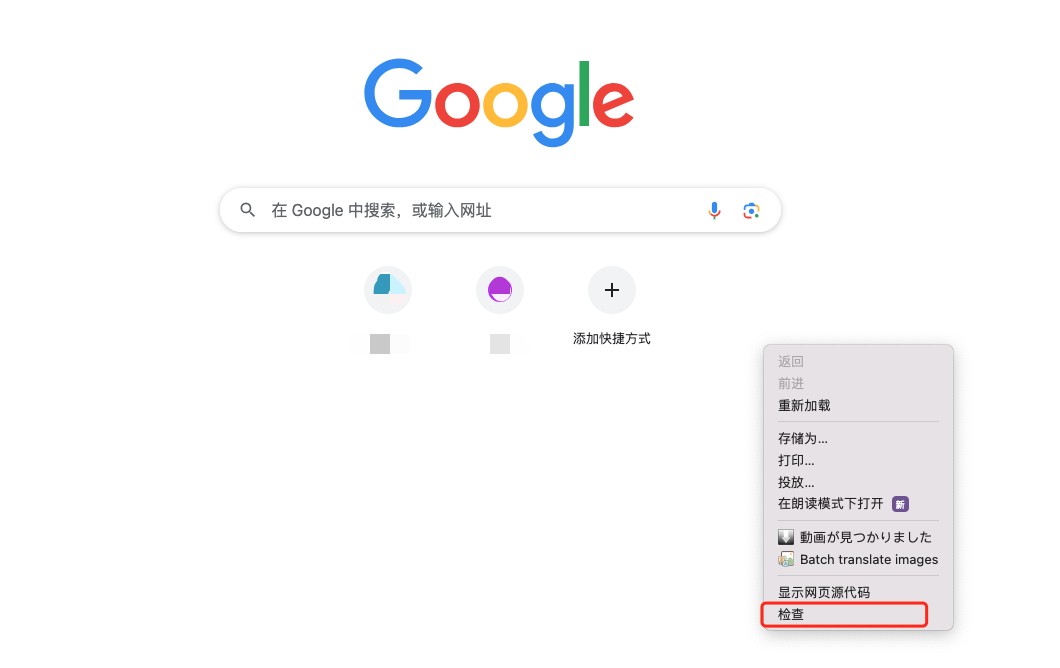
1. 打开一个新标签页，右键点击并选择“检查”，打开开发者工具。\
   ![Step 1](https://help-ptengine-com-vitepress.oss-cn-guangzhou.aliyuncs.com/FAQ/tag/jianchata.png)
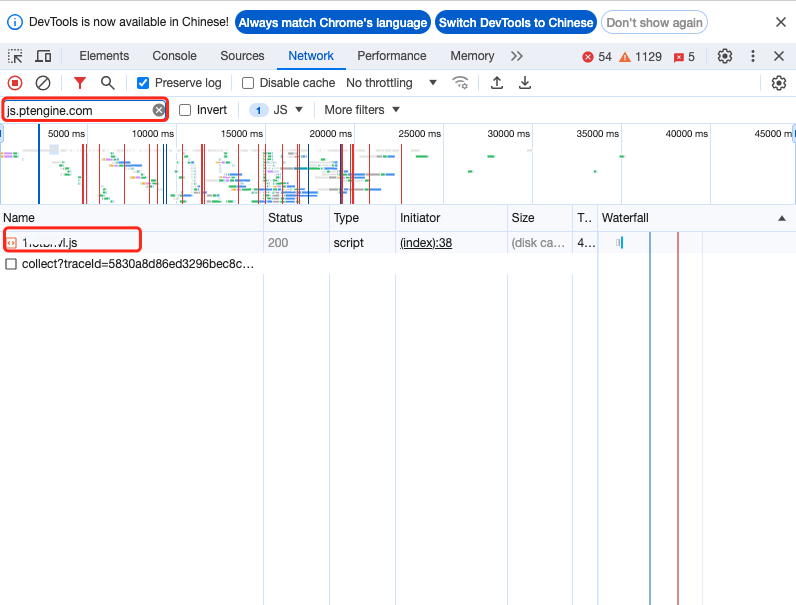
2. 选择“Network”，并使用“js.ptengine.com”进行过滤。

   ![Step 2](https://help-ptengine-com-vitepress.oss-cn-guangzhou.aliyuncs.com/FAQ/tag/jsdaima.png)
3. 输入已部署监测代码的页面URL，并访问该页面。
4. 在“js”部分，您可以确认基本标签的加载时间（在正常的网络通信环境下，加载时间通常以毫秒为单位）。\
   下图中红框内的最下方是您网站的加载时间。\
   ![Step 3](/files/sSQKRUixkuztOqTWwEEe)


---

# Agent Instructions: Querying This Documentation

If you need additional information that is not directly available in this page, you can query the documentation dynamically by asking a question.

Perform an HTTP GET request on the current page URL with the `ask` query parameter:

```
GET https://helps.ptengine.com/cn/faq/tracking-code/page-load-impact.md?ask=<question>
```

The question should be specific, self-contained, and written in natural language.
The response will contain a direct answer to the question and relevant excerpts and sources from the documentation.

Use this mechanism when the answer is not explicitly present in the current page, you need clarification or additional context, or you want to retrieve related documentation sections.