> For the complete documentation index, see [llms.txt](https://helps.ptengine.com/llms.txt). Markdown versions of documentation pages are available by appending `.md` to page URLs; this page is available as [Markdown](https://helps.ptengine.com/cn/start-guide/quick/create-project.md).
# 如何创建档案
档案是 Ptengine 里的分析单位,对应一个网站或一组网站。开始用 Ptengine 的第一步就是建一个档案。
***
## 开始之前:先定“分开看还是合并看”
一个档案可以登记多个域名。**同一个档案共用同一段基础代码,不同档案的代码各不相同。**
| 你的情况 | 建议 |
| ------------------ | --------------- |
| 几个域名要**分开**统计,互不干扰 | 每个域名建一个独立档案 |
| 几个域名要**合并**看整体数据 | 建一个档案,在里面登记多个域名 |
> 这个决定之后再改会很麻烦(代码要重装、历史数据不互通),建议一开始就想清楚。 能登记几个域名取决于你的套餐。
***
## 创建步骤
{% stepper %}
{% step %}
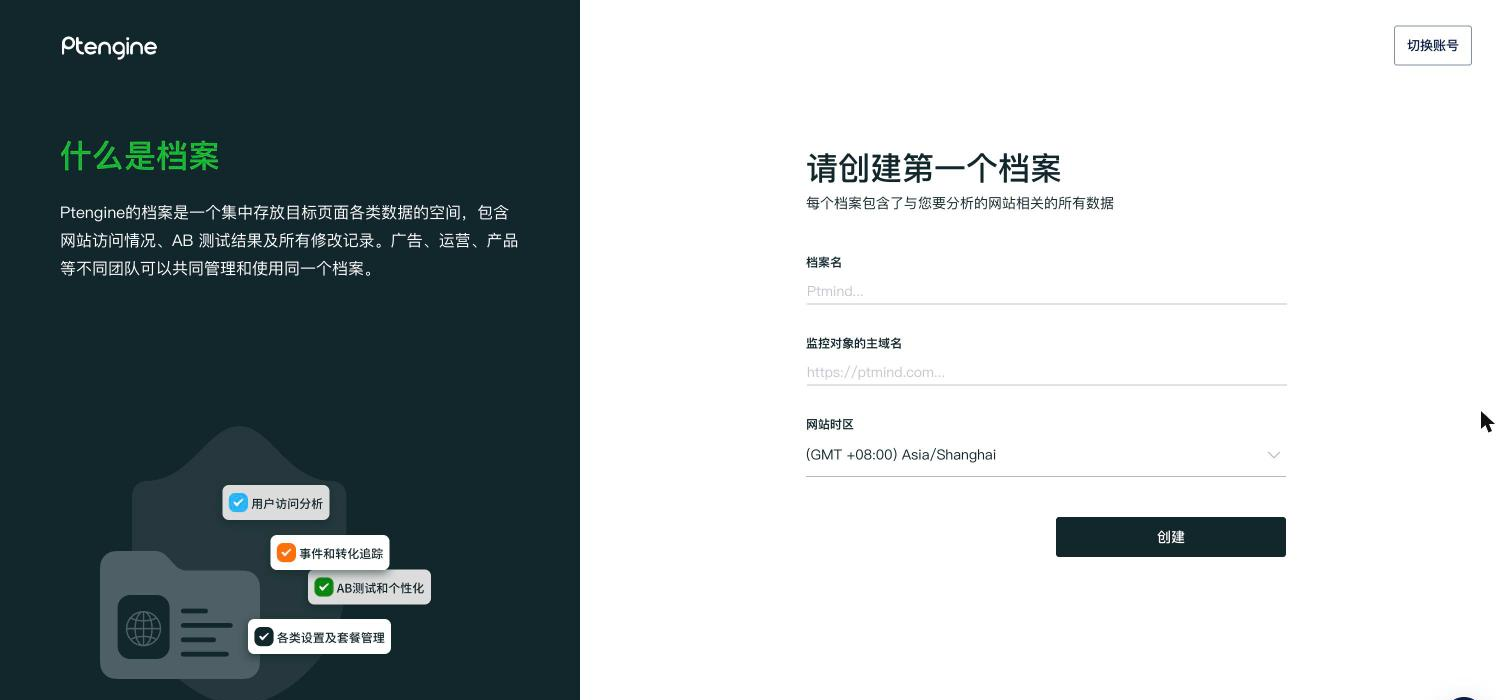
**点确认邮件里的按钮,进入“请创建第一个档案”**
注册后会收到一封确认邮件,点里面的按钮完成验证,**浏览器会直接落到档案创建页**,不用自己找入口。
要填三项:
| 字段 | 填什么 |
| -------- | --------------------------------- |
| 档案名 | 自己看得懂就行,之后可以改 |
| 监控对象的主域名 | 要分析的网站主域名。填主域名即可,其下所有子域名默认都在监测范围内 |
| 网站时区 | 决定报告按哪个时区切天,**建议一开始就选对** |
填完点**创建**。
 {% endstep %}
{% step %}
**在“部署代码”这一步拿基础代码**
档案一建好就进这一屏。先在第 1 步选平台(HTML / Google Tag Manager / Shopify / Shoplaza),第 2 步**复制代码**装到页面 `` 里,第 3 步填上线后的 URL 点**检查**确认装对了。
{% endstep %}
{% step %}
**在“部署代码”这一步拿基础代码**
档案一建好就进这一屏。先在第 1 步选平台(HTML / Google Tag Manager / Shopify / Shoplaza),第 2 步**复制代码**装到页面 `` 里,第 3 步填上线后的 URL 点**检查**确认装对了。
 {% hint style="info" %}
右上角有**跳过**和**邀请他人安装**。代码要交给工程师装的话,用“邀请他人安装”把这一步发出去;想先逛逛产品就点“跳过”,之后随时能回来装。
{% endhint %}
详见 [基础代码的安装方法](/cn/start-guide/quick/tag-setup.md)、[档案名称和域名设置](/cn/start-guide/quick/domain-setting.md)。
{% endstep %}
{% step %}
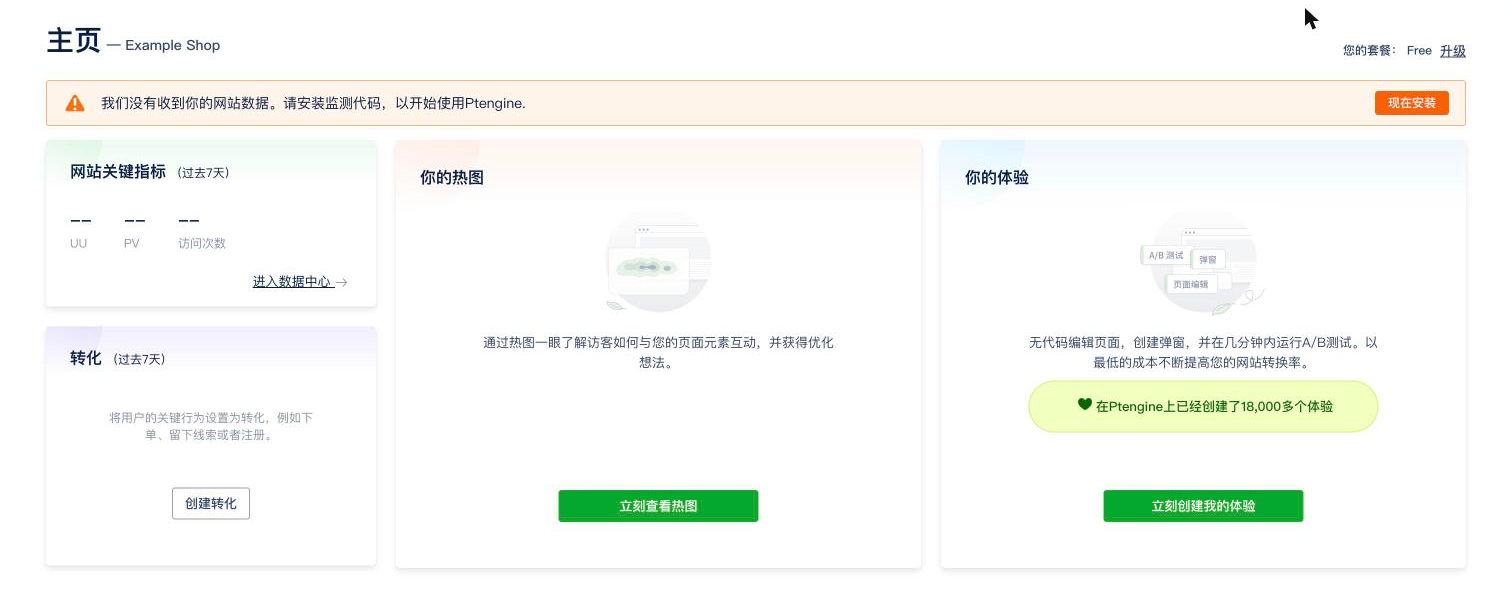
**装完代码才会有数据**
跳过或还没装代码时,主页顶部会一直挂着“我们没有收到你的网站数据”的提醒,各项指标显示为 `--`。装好代码并有人访问后,数据才开始进来。
{% hint style="info" %}
右上角有**跳过**和**邀请他人安装**。代码要交给工程师装的话,用“邀请他人安装”把这一步发出去;想先逛逛产品就点“跳过”,之后随时能回来装。
{% endhint %}
详见 [基础代码的安装方法](/cn/start-guide/quick/tag-setup.md)、[档案名称和域名设置](/cn/start-guide/quick/domain-setting.md)。
{% endstep %}
{% step %}
**装完代码才会有数据**
跳过或还没装代码时,主页顶部会一直挂着“我们没有收到你的网站数据”的提醒,各项指标显示为 `--`。装好代码并有人访问后,数据才开始进来。
 {% endstep %}
{% endstepper %}
***
## 之后怎么切换档案
已有多个档案时,点界面**右上角的档案名称**打开“档案一览”,在搜索框里打字筛,或点“所有档案”进入完整列表页。左下角的“档案+”可以直接新建。

{% hint style="info" %}
是**右上角**,不是左上角——左上角是 Ptengine 的 logo。
{% endhint %}
***
## 做完之后怎么确认
1. 基础代码装好后,等 **30 分钟以上**再看数据(实时数据除外)
2. 仍然没有数据 → [确认基础代码是否正常触发](/cn/faq/start-guide/check-tag-firing.md)
***
## 相关页面
* [档案名称和域名设置](/cn/start-guide/quick/domain-setting.md)
* [基础代码的安装方法](/cn/start-guide/quick/tag-setup.md)
* [成员邀请和权限授予](/cn/start-guide/quick/member-invitation.md) — 把同事拉进这个档案
* [主域名与子域名的区别](/cn/faq/tag-and-domain/domain-main-vs-sub.md)
{% endstep %}
{% endstepper %}
***
## 之后怎么切换档案
已有多个档案时,点界面**右上角的档案名称**打开“档案一览”,在搜索框里打字筛,或点“所有档案”进入完整列表页。左下角的“档案+”可以直接新建。

{% hint style="info" %}
是**右上角**,不是左上角——左上角是 Ptengine 的 logo。
{% endhint %}
***
## 做完之后怎么确认
1. 基础代码装好后,等 **30 分钟以上**再看数据(实时数据除外)
2. 仍然没有数据 → [确认基础代码是否正常触发](/cn/faq/start-guide/check-tag-firing.md)
***
## 相关页面
* [档案名称和域名设置](/cn/start-guide/quick/domain-setting.md)
* [基础代码的安装方法](/cn/start-guide/quick/tag-setup.md)
* [成员邀请和权限授予](/cn/start-guide/quick/member-invitation.md) — 把同事拉进这个档案
* [主域名与子域名的区别](/cn/faq/tag-and-domain/domain-main-vs-sub.md)