> For the complete documentation index, see [llms.txt](https://helps.ptengine.com/llms.txt). Markdown versions of documentation pages are available by appending `.md` to page URLs; this page is available as [Markdown](https://helps.ptengine.com/cn/start-guide/quick/member-invitation.md).
# 成员邀请和权限授予
## 团队成员管理和档案共享
Ptengine允许您邀请团队成员或客户端,并共享档案内容。这使高效的协作和信息共享成为可能。
## 成员邀请
点击【成员管理】右上角的【邀请成员】,选择电子邮件地址和要授予的权限,即可邀请成员。
【邀请邮箱】支持一次输入多个邮箱,每输入一个按回车添加。
## 权限类型
Ptengine 提供以下 5 个权限级别:
| 权限 | 覆盖范围 |
| ----------- | --------------------------------------------------------------------------------------------------------------------------- |
| **创建者** | 档案的最高权限:计费计划管理、成员管理、档案设置,以及 Insight 和 Experience 的全部功能。每个档案只有一个创建者,转让方式见[账户转移(更换所有者)](/cn/account-settings/change-owner.md) |
| **管理员** | 管理档案设置、邀请成员,包含发布者的全部权限 |
| **发布者** | 发布体验,包含编辑者和分析师的全部权限 |
| **编辑者和分析师** | 数据管理、创建和编辑体验(不能发布),包含查看者的全部权限 |
| **查看者** | 查看流量及用户报告、热图、体验报告 |
## 权限详情
💡 每个权限级别都包含所有较低级别的权限。例如发布者同时具备编辑者和分析师的权限。
📌 创建者拥有最高权限,可以管理档案的所有方面;查看者仅限查看和分析报告。
🔒 按团队成员的职责分配权限,既能收紧访问范围,也让档案管理更清晰。
## 跨档案成员管理
{% hint style="info" %}
以下功能面向欧美地区账号的新版套餐档案开放。相关入口只在拥有【管理员】或【创建者】权限的档案上显示,看不到入口时说明当前账号或档案不在开放范围内。
{% endhint %}
同时管理多个档案时,成员的邀请、复制和移除都可以一次覆盖多个档案,不用逐个档案重复操作。三个入口都在【成员管理】页面。
 页面右侧的【成员数量】显示当前档案的席位使用情况。
三个功能里出现的档案列表都只包含**同时满足**以下条件的档案:
* 拥有【管理员】或【创建者】权限(列表上方标注“仅显示你有管理权限的档案”)
* 使用新版套餐
* 与当前档案属于同一地区
### 邀请成员到多个档案
点击【邀请成员】,在【邀请邮箱】里输入邮箱(每输入一个按回车添加),选好权限后,下方的【应用到档案】区域列出可选档案。
页面右侧的【成员数量】显示当前档案的席位使用情况。
三个功能里出现的档案列表都只包含**同时满足**以下条件的档案:
* 拥有【管理员】或【创建者】权限(列表上方标注“仅显示你有管理权限的档案”)
* 使用新版套餐
* 与当前档案属于同一地区
### 邀请成员到多个档案
点击【邀请成员】,在【邀请邮箱】里输入邮箱(每输入一个按回车添加),选好权限后,下方的【应用到档案】区域列出可选档案。
 * 当前档案带“(当前)”标记,默认勾选且不可取消
* 支持按档案名搜索,也可以【全选】
* **已是所选档案成员的用户会被跳过,其权限保持不变** —— 邀请名单里混有老成员时,不会覆盖对方在该档案的现有权限
每位被邀请人只收到一封邮件,邮件中列出本次获得访问权的全部档案。
提交后按档案返回结果。有档案失败时,提示成功和失败的档案数量,已成功的档案不受影响。
### 复制成员
把一个档案的成员配置搬到另一个档案,不用重新输入邮箱。点击【复制成员】打开弹窗,里面有两个方向可选。
**复制到其他档案**
适用于本档案的团队也需要负责其他站点,把现有成员批量授权到对应档案。
* 当前档案带“(当前)”标记,默认勾选且不可取消
* 支持按档案名搜索,也可以【全选】
* **已是所选档案成员的用户会被跳过,其权限保持不变** —— 邀请名单里混有老成员时,不会覆盖对方在该档案的现有权限
每位被邀请人只收到一封邮件,邮件中列出本次获得访问权的全部档案。
提交后按档案返回结果。有档案失败时,提示成功和失败的档案数量,已成功的档案不受影响。
### 复制成员
把一个档案的成员配置搬到另一个档案,不用重新输入邮箱。点击【复制成员】打开弹窗,里面有两个方向可选。
**复制到其他档案**
适用于本档案的团队也需要负责其他站点,把现有成员批量授权到对应档案。
 1. 在【选择成员】里勾选要授权出去的成员
2. 在【应用到档案】里勾选目标档案
3. 点击【复制】
**从其他档案复制**
适用于初始化当前档案的团队,从已有档案一次同步成员进来。
1. 在【选择成员】里勾选要授权出去的成员
2. 在【应用到档案】里勾选目标档案
3. 点击【复制】
**从其他档案复制**
适用于初始化当前档案的团队,从已有档案一次同步成员进来。
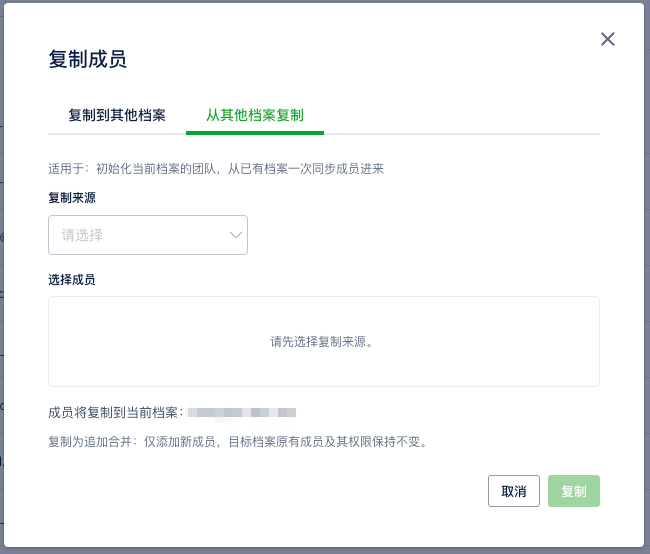 1. 在【复制来源】里选择来源档案
2. 在【选择成员】里勾选要复制的人
3. 点击【复制】
这个方向的目标固定为当前档案,弹窗里会写明“成员将复制到当前档案:档案名”。
两个方向遵循同样的规则:
* 成员按其**在来源档案的权限**复制过去
* 【创建者】不能复制。该行仍显示在成员列表里,但权限位变成“该权限不可复制”且无法勾选
* 复制为追加合并:**仅添加新成员,目标档案原有成员及其权限保持不变**
**新建档案后的引导**
新建档案后会弹出提示,询问是否从已有档案复制成员。选择【去复制】直接跳到新档案的成员管理页并打开【从其他档案复制】,只需选来源和成员;选择【暂不需要】按原流程进入档案首页。
### 从多个档案移除成员
在成员列表中点击目标成员所在行的【•••】,选择【从多个档案移除】。
1. 在【复制来源】里选择来源档案
2. 在【选择成员】里勾选要复制的人
3. 点击【复制】
这个方向的目标固定为当前档案,弹窗里会写明“成员将复制到当前档案:档案名”。
两个方向遵循同样的规则:
* 成员按其**在来源档案的权限**复制过去
* 【创建者】不能复制。该行仍显示在成员列表里,但权限位变成“该权限不可复制”且无法勾选
* 复制为追加合并:**仅添加新成员,目标档案原有成员及其权限保持不变**
**新建档案后的引导**
新建档案后会弹出提示,询问是否从已有档案复制成员。选择【去复制】直接跳到新档案的成员管理页并打开【从其他档案复制】,只需选来源和成员;选择【暂不需要】按原流程进入档案首页。
### 从多个档案移除成员
在成员列表中点击目标成员所在行的【•••】,选择【从多个档案移除】。
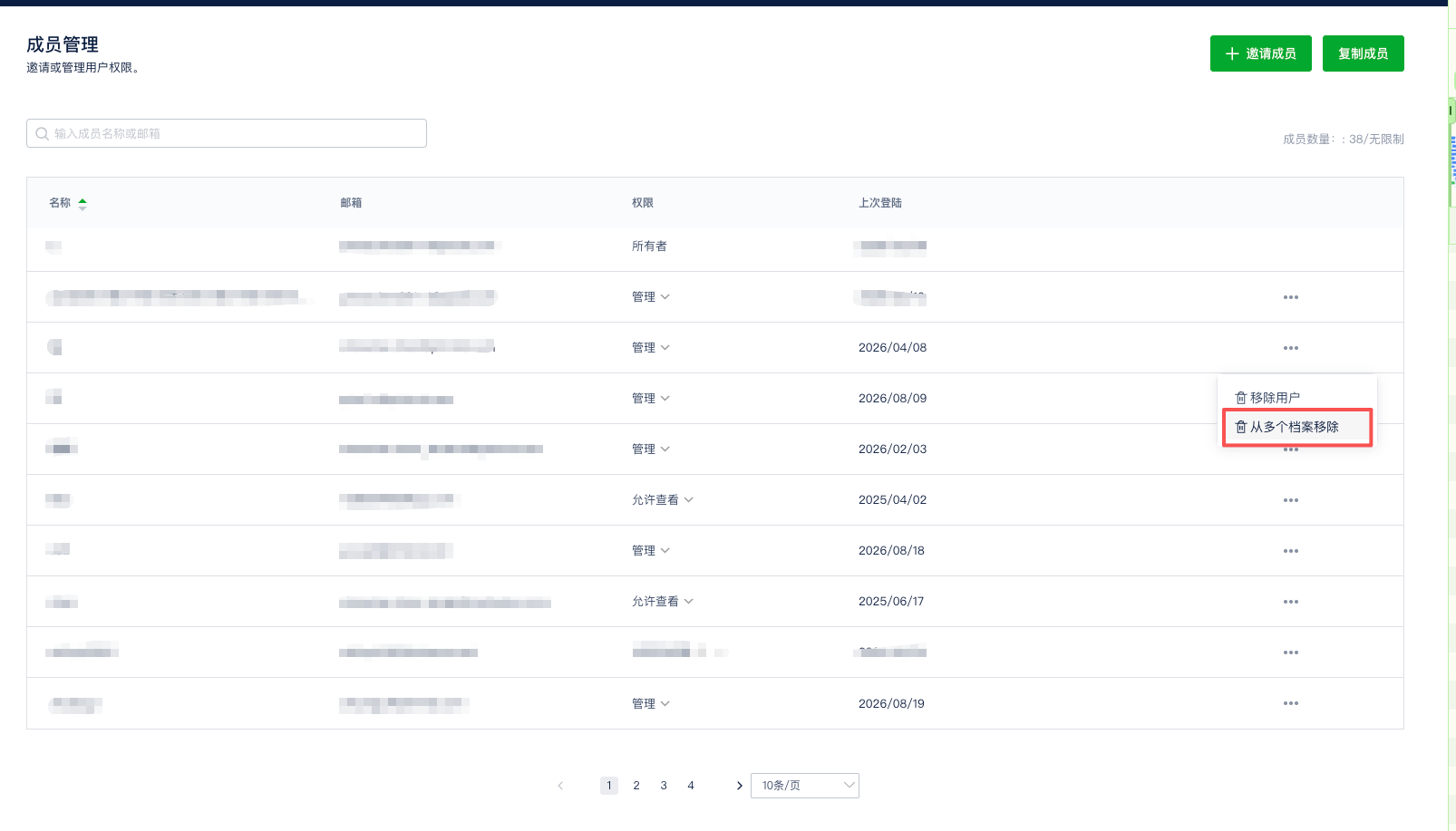 弹窗里勾选要一起移除的其他档案。**当前档案一定会被移除**,列表里列出的是该成员所在的其他可管理档案,默认都不勾选。
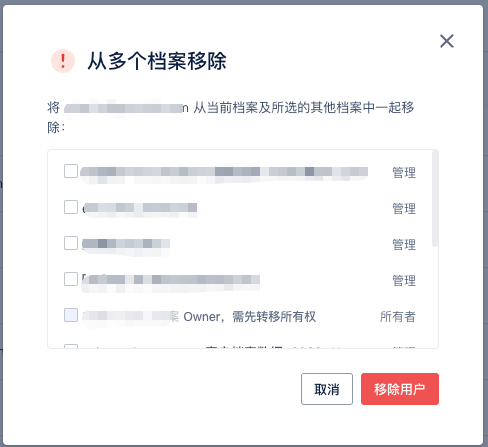 * 该成员在某个档案是【创建者】时,该档案不可勾选,权限位显示“Owner,需先转移所有权”。先在那个档案完成[账户转移(更换所有者)](/cn/account-settings/change-owner.md),再回来移除
* 确认按钮是红色的【移除用户】
* 有档案移除失败时,提示成功和失败的档案数量,不会静默跳过
移除只解除该成员对所选档案的访问权,不会删除其 Ptengine 账号,也不影响其在未勾选档案中的权限。
### 常见问题
**看不到【应用到档案】或【复制成员】?**
按以下顺序确认:
1. 账号所属地区是否在开放范围内(目前仅欧美地区账号开放)
2. 可管理的档案是否有两个以上 —— 只有一个可管理档案时,不显示档案多选区和【复制成员】入口
3. 目标档案是否为新版套餐 —— 旧套餐档案不会出现在任何档案列表里
**想调整已有成员在其他档案的权限?**
邀请和复制都会跳过已有成员、不动其权限。需要调整时,切到该档案的【成员管理】,在成员所在行的【权限】列直接改。
***
## 相关页面
* [账户转移(更换所有者)](/cn/account-settings/change-owner.md) — 把创建者权限交给别人
* [如何创建档案](/cn/start-guide/quick/create-project.md)
* [档案二要素认证(2FA)](/cn/account-settings/profile-2fa.md) — 给整个档案加一道验证
* 该成员在某个档案是【创建者】时,该档案不可勾选,权限位显示“Owner,需先转移所有权”。先在那个档案完成[账户转移(更换所有者)](/cn/account-settings/change-owner.md),再回来移除
* 确认按钮是红色的【移除用户】
* 有档案移除失败时,提示成功和失败的档案数量,不会静默跳过
移除只解除该成员对所选档案的访问权,不会删除其 Ptengine 账号,也不影响其在未勾选档案中的权限。
### 常见问题
**看不到【应用到档案】或【复制成员】?**
按以下顺序确认:
1. 账号所属地区是否在开放范围内(目前仅欧美地区账号开放)
2. 可管理的档案是否有两个以上 —— 只有一个可管理档案时,不显示档案多选区和【复制成员】入口
3. 目标档案是否为新版套餐 —— 旧套餐档案不会出现在任何档案列表里
**想调整已有成员在其他档案的权限?**
邀请和复制都会跳过已有成员、不动其权限。需要调整时,切到该档案的【成员管理】,在成员所在行的【权限】列直接改。
***
## 相关页面
* [账户转移(更换所有者)](/cn/account-settings/change-owner.md) — 把创建者权限交给别人
* [如何创建档案](/cn/start-guide/quick/create-project.md)
* [档案二要素认证(2FA)](/cn/account-settings/profile-2fa.md) — 给整个档案加一道验证