> For the complete documentation index, see [llms.txt](https://helps.ptengine.com/llms.txt). Markdown versions of documentation pages are available by appending `.md` to page URLs; this page is available as [Markdown](https://helps.ptengine.com/en/start-guide/what-is-ptengine/ptengine-kit.md).
# Ptengine Kit
## What is Ptengine Kit
An evolved version of Ptengine Assistant, primarily a browser extension for capturing full-screen heatmaps (Developer: Ptmind).
{% hint style="success" %}
**Why not integrate with Ptengine Assistant?**
Google has become stricter with restrictions on extensions, so we could not release them in an integrated state.
For this reason, they are currently separate.
{% endhint %}
## Ptengine Assistant vs Ptengine Kit Comparison
| Assistant | Kit |
| ------------------------------------------- | ----------------------- |
| Speeds up heatmap and Inline editor loading | Full-page screenshot |
| Quick login to Ptengine | Quick login to Ptengine |
| Easy heatmap viewing | Easy heatmap viewing |
## Installation
1. Install the extension from [Chrome Web Store](https://chromewebstore.google.com/detail/ptengine-kit/aoaemnjgkappnciapncpgegedccejcdn?hl=en)
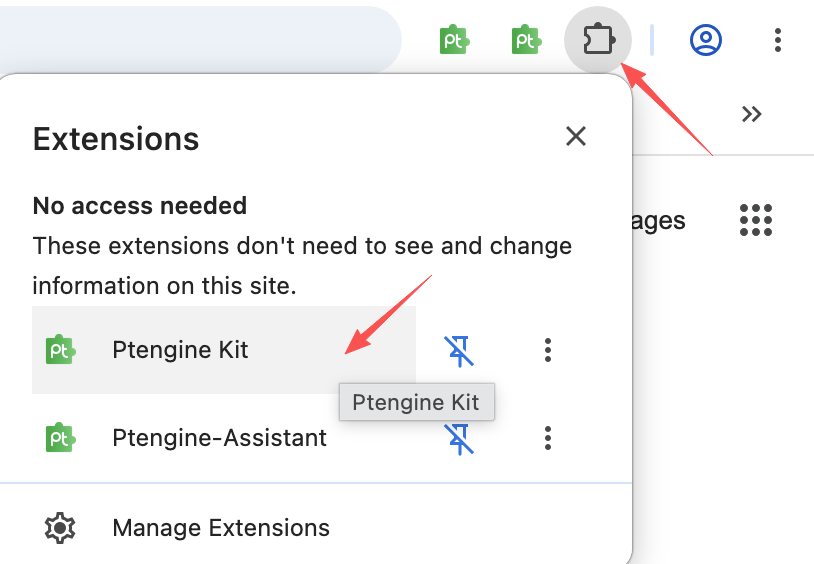
2. After installation, click the extension icon in the top right of the screen and pin Ptengine Kit to your browser from the pin icon
{% hint style="info" %}
After installation, refresh the page in Ptengine. You can then use the Ptengine Kit extension to capture heatmaps directly from your browser.
{% endhint %}
## How to Use
1. Open the Ptengine heatmap page
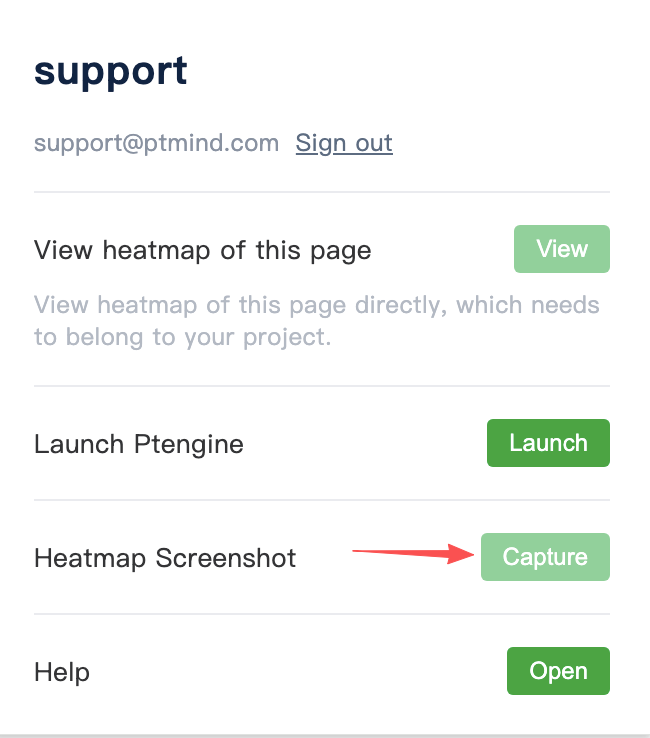
2. Click the screenshot button in the toolbar — Ptengine Kit will automatically capture the full-page heatmap
3. Once the capture is complete, download the result
Related page: [How to use screenshots](/en/insight/smart-heatmap/screenshot.md)