# A/Bテスト体験の作成ガイド

## 新規作成

Experienceでは、新規でA/Bテストを作成するか、または既存の体験にテストパターンを追加することができます。以下では新規作成の方法を記載します。

1. **体験を新規作成**

   ![](/files/EWwu7q4NG7Al8BnMrogV)
2. **A/Bテストを選択**

   <figure><img src="/files/XwL8ToSD57kb3H63M3A6" alt=""><figcaption></figcaption></figure>
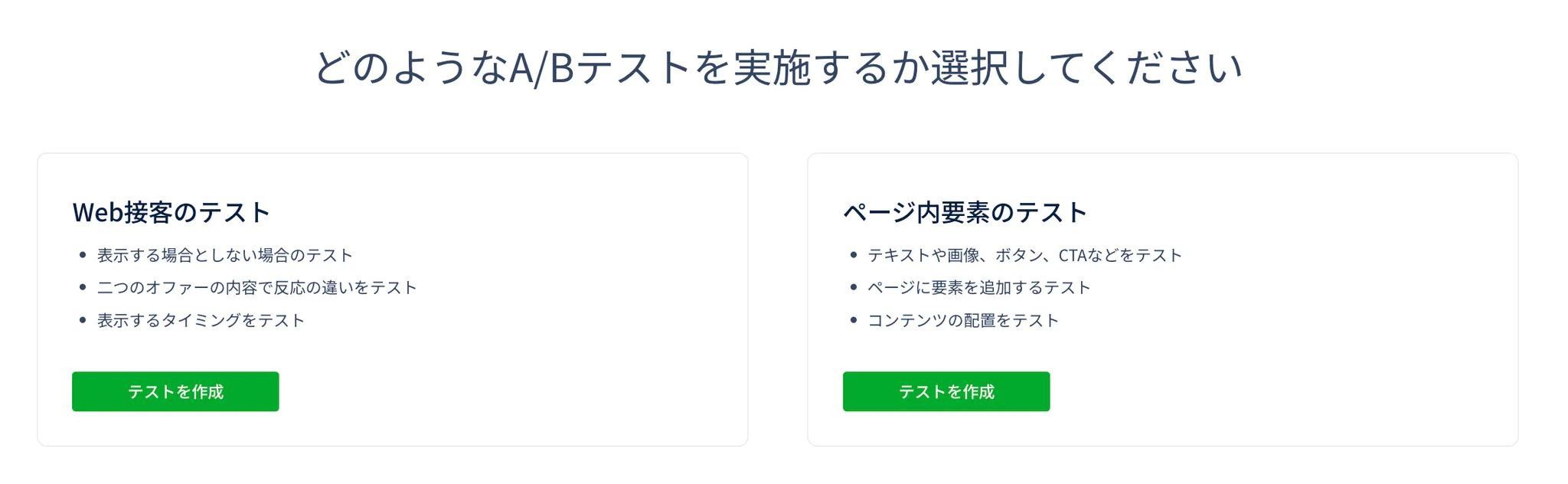
3. **実施したいテストの種類を選択**

   * Web接客のテストでは、ポップアップの有無やポップアップの訴求内容の違いをテストできます。
   * ページ内要素のテストでは、ページの既存コンテンツを編集し、違いをテストできます。

   やりたい施策に合わせて選択してください。

<figure><img src="/files/vYfGf3SbnhfykQ0bnnQ9" alt=""><figcaption></figcaption></figure>


---

# Agent Instructions: Querying This Documentation

If you need additional information that is not directly available in this page, you can query the documentation dynamically by asking a question.

Perform an HTTP GET request on the current page URL with the `ask` query parameter:

```
GET https://helps.ptengine.com/experience/campaign/create-new-2.md?ask=<question>
```

The question should be specific, self-contained, and written in natural language.
The response will contain a direct answer to the question and relevant excerpts and sources from the documentation.

Use this mechanism when the answer is not explicitly present in the current page, you need clarification or additional context, or you want to retrieve related documentation sections.