> For the complete documentation index, see [llms.txt](https://helps.ptengine.com/llms.txt). Markdown versions of documentation pages are available by appending `.md` to page URLs; this page is available as [Markdown](https://helps.ptengine.com/experience/campaign/create-new-2/creative-production.md).
# クリエイティブの作成
作成
## 新規作成
**クリエイティブを作成**
* Web接客のクリエイティブの作成は[こちら](/experience/campaign/create-new-1/creative-editing.md)の記事を参照してください。
* ページ内要素のクリエイティブの作成は[こちら](/experience/campaign/create-new/editor-usage.md)の記事を参照してください。
## パターンの追加作成
新規作成したクリエイティブを保存し、以下いずれの方法でパターンを追加してください。
* パターンを追加作成する
* オリジナルページと比較テストを選択する(テストパターンは、最大 5 パターンを追加することができます。)

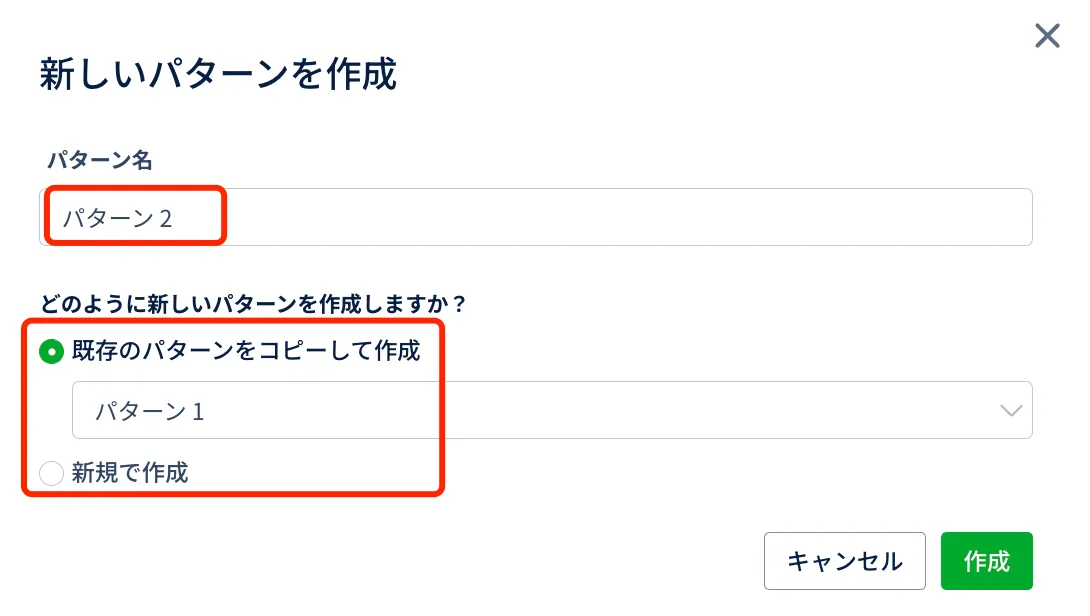
* パターンを追加する
* パターン名を変更できます。
* 既存のパターンをコピーして作成もしくはパターンを新規で作成できます。
 * オリジナルと比較テスト
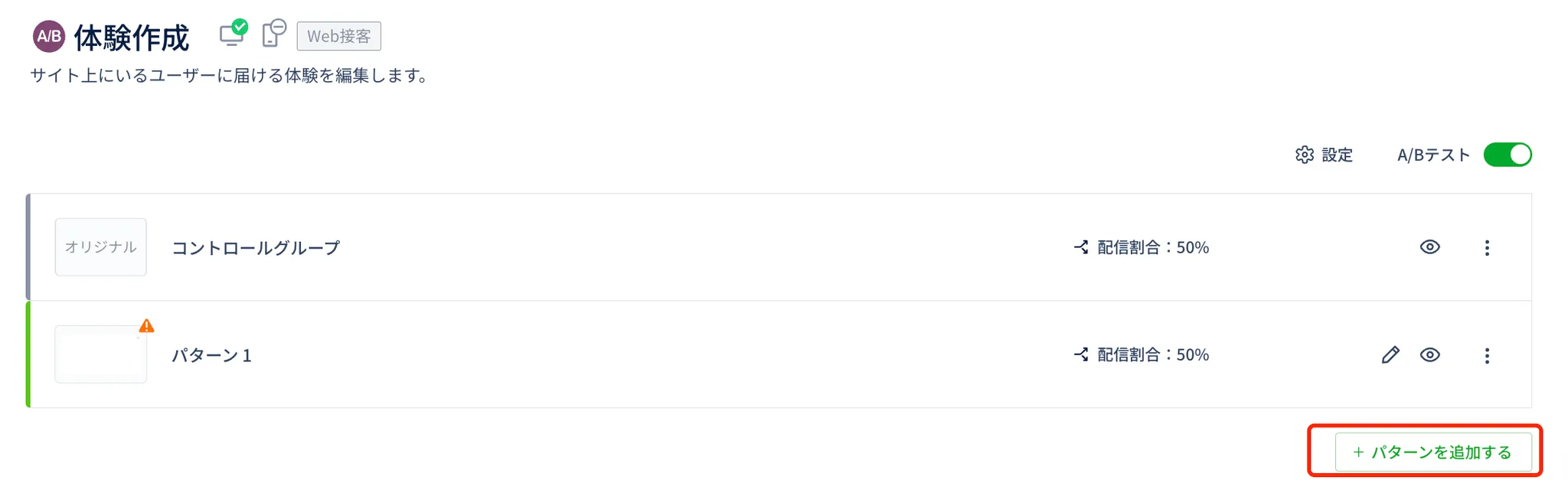
* コントロールグループが追加されます。
* 更にパターンを追加したい場合、右下にある「パターンを追加する」ボタンをクリックください。
* オリジナルと比較テスト
* コントロールグループが追加されます。
* 更にパターンを追加したい場合、右下にある「パターンを追加する」ボタンをクリックください。
 ### **既存の体験から追加する方法**
既存の体験にテストパターンを追加したい場合は、追加したい体験の編集画面に入り、A/BテストをONにしてください。
そして、コントロールグループが追加されます。
{% hint style="danger" %}
**Warning:**
・オリジナルページ(何も編集を加えていないページ)を「パターン」として追加すると、配信されません。
{% endhint %}
{% hint style="success" %}
**Note:**
・テストパターンで設定したデバイスは、オリジナルパターンにも自動的に適用されます。
{% endhint %}
### **既存の体験から追加する方法**
既存の体験にテストパターンを追加したい場合は、追加したい体験の編集画面に入り、A/BテストをONにしてください。
そして、コントロールグループが追加されます。
{% hint style="danger" %}
**Warning:**
・オリジナルページ(何も編集を加えていないページ)を「パターン」として追加すると、配信されません。
{% endhint %}
{% hint style="success" %}
**Note:**
・テストパターンで設定したデバイスは、オリジナルパターンにも自動的に適用されます。
{% endhint %}