> For the complete documentation index, see [llms.txt](https://helps.ptengine.com/llms.txt). Markdown versions of documentation pages are available by appending `.md` to page URLs; this page is available as [Markdown](https://helps.ptengine.com/faq/others/matching-rules.md).
# マッチングルールの詳細
体験の配信条件、ページグループ、コンバージョン、イベント設定では、下記のルールを使用してデータをマッチングさせる条件を定義します。
## 含む
特定の文字列を含むURLを対象に定義します。例えば、「`abc.com`」を「含む」と登録すると、下記のようなURLが対象に含まれます。
```
https://abc.com/lp
https://abc.com/company
https://abc.com/company/contact
```
## 含まない
特定の文字列を含まないURLを対象に定義します。
例えば、ブログページ以外の全てのページを対象としたい場合は、「`example.com/blog`」を「含まない」で登録します。
### **入力欄に複数の内容がある場合**
いずれかの内容が含まれると、対象外となります。
例えば、下記のように設定したら、2 つのページにアクセスしたユーザー(どちらか一つへのアクセスでも)がキャンペーンの対象外とされます。
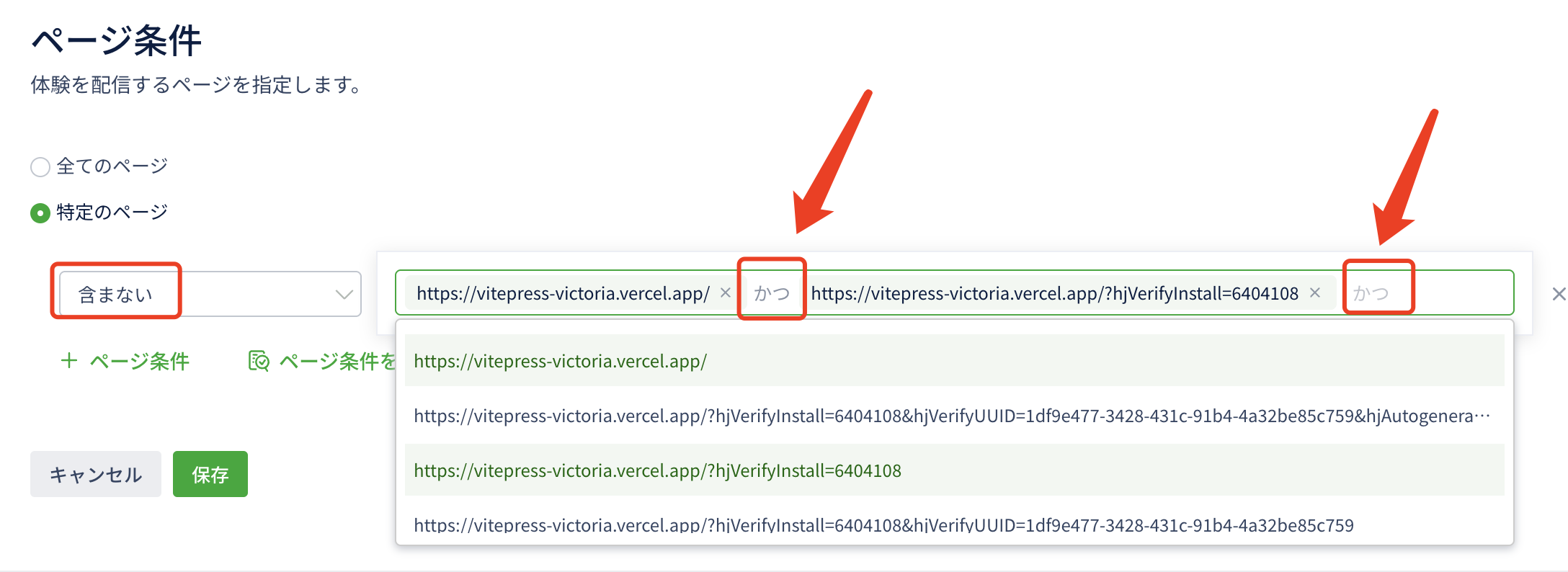 サブディレクトリーのみの入力も同じです。
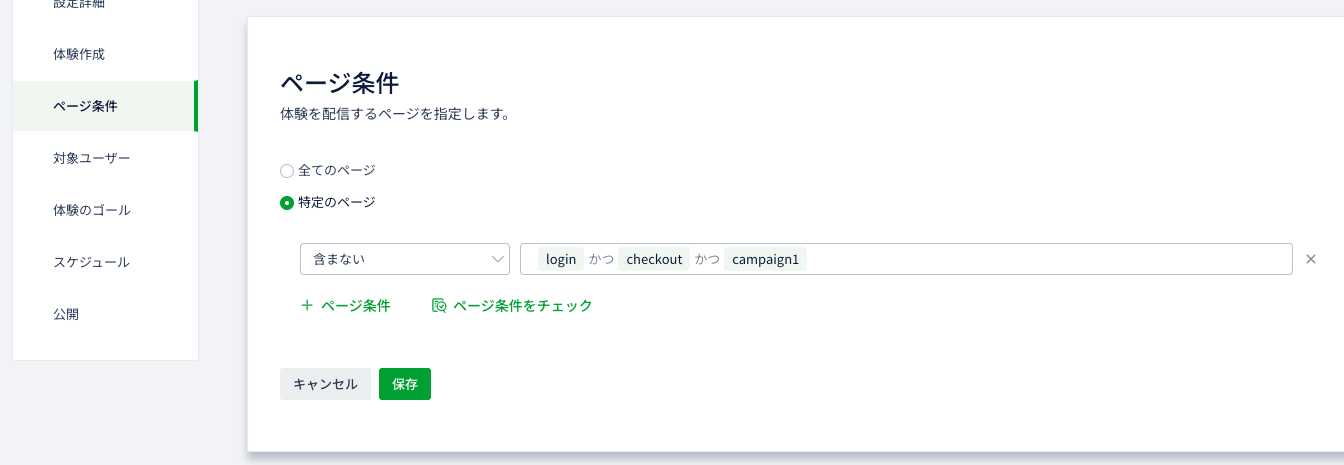 以下のURLがいずれも条件にマッチングできないため、対象外です体験表示対象外です。
```
https://abc.com/company/login
https://abc.com/company/checkout
https://abc.com/company/campaign1
https://abc.com/company/login/checkout/campaign1
```
## 前方一致
登録した文字列が、URLの先頭と一致するURLを対象に定義します。
クエリパラメータを含むURLが対象となる場合によく利用されます。
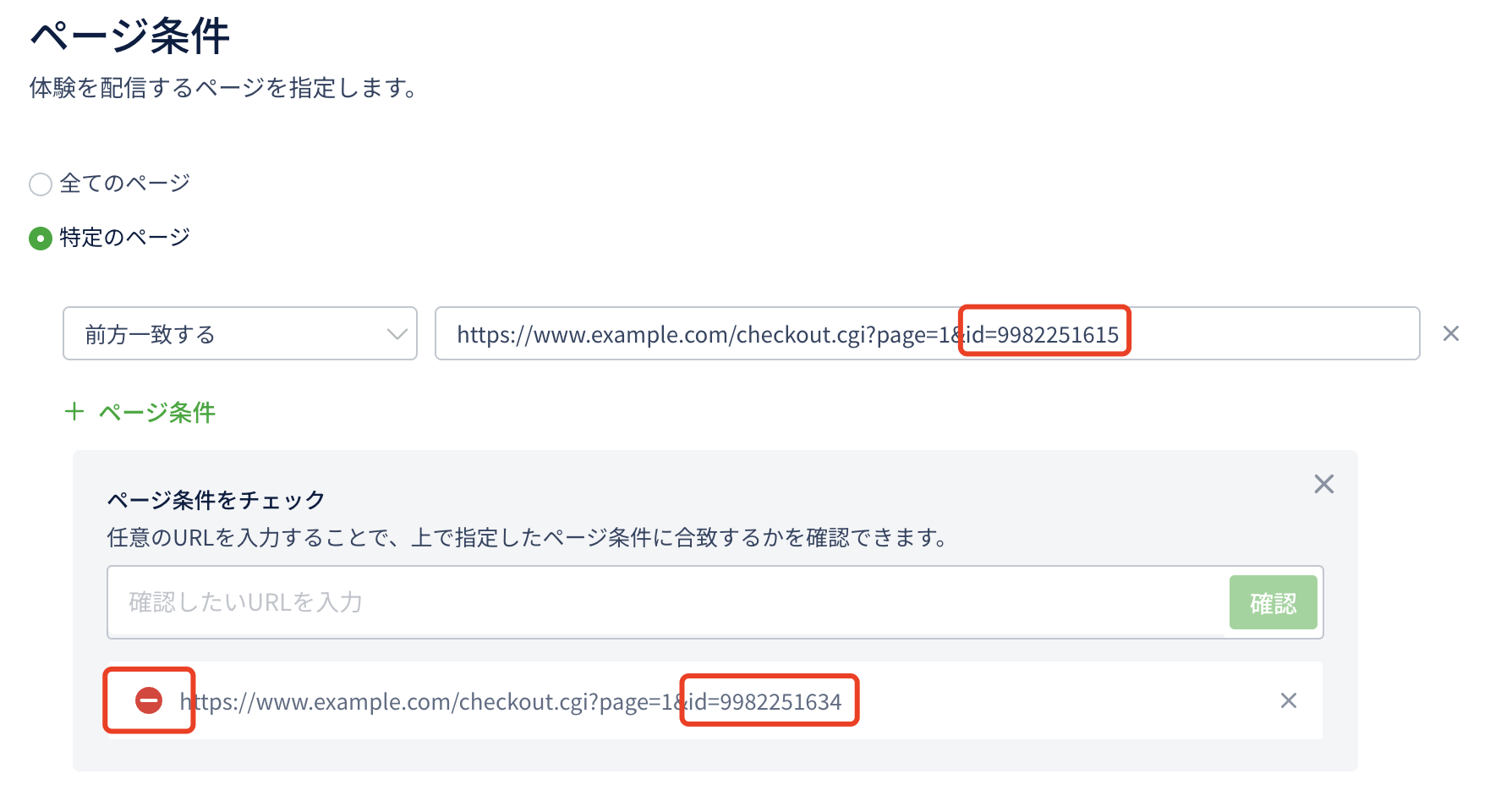
例えば、特定の訪問者(id=9982251615)が訪問した際に下記のURLが発行されるとします。
```
https://www.example.com/checkout.cgi?page=1&id=9982251615
```
上記のURLを前方一致で登録すると、id=9982251615以外のユーザーの訪問は対象に定義されません。
以下のURLがいずれも条件にマッチングできないため、対象外です体験表示対象外です。
```
https://abc.com/company/login
https://abc.com/company/checkout
https://abc.com/company/campaign1
https://abc.com/company/login/checkout/campaign1
```
## 前方一致
登録した文字列が、URLの先頭と一致するURLを対象に定義します。
クエリパラメータを含むURLが対象となる場合によく利用されます。
例えば、特定の訪問者(id=9982251615)が訪問した際に下記のURLが発行されるとします。
```
https://www.example.com/checkout.cgi?page=1&id=9982251615
```
上記のURLを前方一致で登録すると、id=9982251615以外のユーザーの訪問は対象に定義されません。
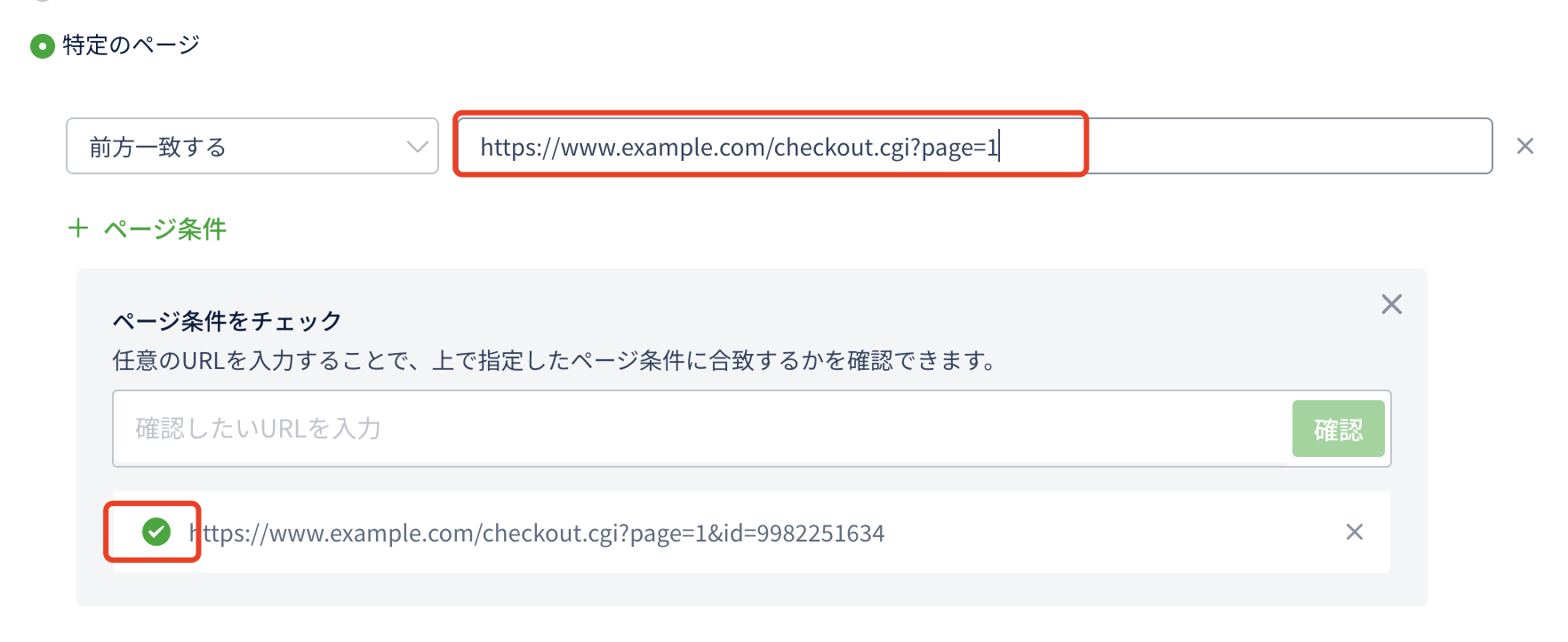
 page=1に制限した上で全ユーザーIDを対象としたい場合は下記のURLを前方一致で登録します。
```
https://www.example.com/checkout.cgi?page=1
```
page=1に制限した上で全ユーザーIDを対象としたい場合は下記のURLを前方一致で登録します。
```
https://www.example.com/checkout.cgi?page=1
```
 また、page=1以外のページも計測対象に含みたい場合は下記のURLを前方一致で登録します。
```
https://www.example.com/checkout.cgi?page
```
## 後方一致
登録した文字列が、URLの末尾と一致するURLを対象に定義します。
例えば、「`/test/index.html`」を後方一致で登録すると、以下のようなURLが対象に定義されます。
```
http://www.example.com/s/test/index.html
```
この場合、前方の文字列が異なる下記のURLも対象に定義されます。
```
http://www.123.com/s/test/index.html
```
しかし、下記のURLは末尾が「/test/index.html」では無いため、対象に定義されません。
```
http://www.example.com/s/test/index.html?wore=xxx
```
## 完全一致
登録したURLと一語一句相違なく一致するURLを対象に定義します。
## 正規表現
正規表現とは、いくつかの文字列を一つの形式で表現するための表現方法です。
正規表現をご利用いただくことで、より自由度の高い条件定義を行うことができます。
### **正規表現の文法**
実正規表現は大量のデータから正規表現のパターンに一致する文字列を検索する際などに使われます。
定義するための条件を指定するには特殊な記号を用います。
これは特殊文字やメタ文字と言われるもので、主にワイルドカード、アンカー、グループ化という種別に区分けできます。
それぞれ下記にて説明します。
**ワイルドカード**

**アンカー**

**グループ化**

**その他**

### 正規表現でよく使わせる組み合わせ
1. ドメインの前方は完全一致し、最後に/または?のパラメーターが付いている場合
```css
正規表現:
^https:\/\/www.ptmind.com($|\/$|\/\?.*)
含まれるURL:
https://www.ptmind.com
https://www.ptmind.com/
https://www.ptmind.com/?WT.mc_id=xxxx
含まれないURL:
https://www.ptmind.com/abc
```
2. httpまたはhttps、そしてサブドメインを含むURLをまとめたい場合
```css
正規表現:
^(http|https):\/\/(sh|bj|tj).ptmind.com
含まれるURL:
http://sh.ptmind.com
http://bj.ptmind.com/abc
http://tj.ptmind.com
https://sh.ptmind.com
https://bj.ptmind.com/?WT.mc_id=xxxx
https://tj.ptmind.com
含まれないURL:
https://www.ptmind.com
```
3. 同じサブディレクトリでまとめたい場合
```css
正規表現:
^http:\/\/ptmind\.com\/price.*$
含まれるURL:
http://ptmind.com/price/page
http://ptmind.com/price?sid=23fwe3r2&vid=345666
http://ptmind.com/price#top
http://ptmind.com/price
含まれないURL: ー
```
4. http か httpsが含まれ、同じメインドメインであるURLを同じサブディレクトリでまとめたい場合
```css
正規表現:
^(http|https):\/\/[a-z0-9]*[.]*ptmind.com\/service\/mng_units\/lp03$
含まれるURL:
http://www.ptmind.com/service/mng_units/lp03
https://www.ptmind.com/service/mng_units/lp03
http://ptmind.com/service/mng_units/lp03
http://a123.ptmind.com/service/mng_units/lp03
https://ptmind.com/service/mng_units/lp03
含まれないURL:ー
```
5. idが該当の範囲にあるURLをまとめたい(6984604から6984783まで)場合
```css
正規表現:
^http:\/\/ptmind.com\/detail\/id=6984([6][1-9][0-9]|[6][0][4-9]|[7][0-7][0-9]|[7][8][0-3])$
含まれるURL:
http://ptmind.com/detail/id=6984604
http://ptmind.com/detail/id=6984783
含まれないURL:
http://ptmind.com/detail/id=6984784
http://ptmind.com/detail/id=6984603
```
#### 正規表現検証ツール
正規表現の記述が正しいかどうかの確認は、[こちら](https://regexper.com/)のようなツールで可能です。
※設定中に何かご不明点ございましたら、製品内チャットでお気軽にご連絡ください。
また、page=1以外のページも計測対象に含みたい場合は下記のURLを前方一致で登録します。
```
https://www.example.com/checkout.cgi?page
```
## 後方一致
登録した文字列が、URLの末尾と一致するURLを対象に定義します。
例えば、「`/test/index.html`」を後方一致で登録すると、以下のようなURLが対象に定義されます。
```
http://www.example.com/s/test/index.html
```
この場合、前方の文字列が異なる下記のURLも対象に定義されます。
```
http://www.123.com/s/test/index.html
```
しかし、下記のURLは末尾が「/test/index.html」では無いため、対象に定義されません。
```
http://www.example.com/s/test/index.html?wore=xxx
```
## 完全一致
登録したURLと一語一句相違なく一致するURLを対象に定義します。
## 正規表現
正規表現とは、いくつかの文字列を一つの形式で表現するための表現方法です。
正規表現をご利用いただくことで、より自由度の高い条件定義を行うことができます。
### **正規表現の文法**
実正規表現は大量のデータから正規表現のパターンに一致する文字列を検索する際などに使われます。
定義するための条件を指定するには特殊な記号を用います。
これは特殊文字やメタ文字と言われるもので、主にワイルドカード、アンカー、グループ化という種別に区分けできます。
それぞれ下記にて説明します。
**ワイルドカード**

**アンカー**

**グループ化**

**その他**

### 正規表現でよく使わせる組み合わせ
1. ドメインの前方は完全一致し、最後に/または?のパラメーターが付いている場合
```css
正規表現:
^https:\/\/www.ptmind.com($|\/$|\/\?.*)
含まれるURL:
https://www.ptmind.com
https://www.ptmind.com/
https://www.ptmind.com/?WT.mc_id=xxxx
含まれないURL:
https://www.ptmind.com/abc
```
2. httpまたはhttps、そしてサブドメインを含むURLをまとめたい場合
```css
正規表現:
^(http|https):\/\/(sh|bj|tj).ptmind.com
含まれるURL:
http://sh.ptmind.com
http://bj.ptmind.com/abc
http://tj.ptmind.com
https://sh.ptmind.com
https://bj.ptmind.com/?WT.mc_id=xxxx
https://tj.ptmind.com
含まれないURL:
https://www.ptmind.com
```
3. 同じサブディレクトリでまとめたい場合
```css
正規表現:
^http:\/\/ptmind\.com\/price.*$
含まれるURL:
http://ptmind.com/price/page
http://ptmind.com/price?sid=23fwe3r2&vid=345666
http://ptmind.com/price#top
http://ptmind.com/price
含まれないURL: ー
```
4. http か httpsが含まれ、同じメインドメインであるURLを同じサブディレクトリでまとめたい場合
```css
正規表現:
^(http|https):\/\/[a-z0-9]*[.]*ptmind.com\/service\/mng_units\/lp03$
含まれるURL:
http://www.ptmind.com/service/mng_units/lp03
https://www.ptmind.com/service/mng_units/lp03
http://ptmind.com/service/mng_units/lp03
http://a123.ptmind.com/service/mng_units/lp03
https://ptmind.com/service/mng_units/lp03
含まれないURL:ー
```
5. idが該当の範囲にあるURLをまとめたい(6984604から6984783まで)場合
```css
正規表現:
^http:\/\/ptmind.com\/detail\/id=6984([6][1-9][0-9]|[6][0][4-9]|[7][0-7][0-9]|[7][8][0-3])$
含まれるURL:
http://ptmind.com/detail/id=6984604
http://ptmind.com/detail/id=6984783
含まれないURL:
http://ptmind.com/detail/id=6984784
http://ptmind.com/detail/id=6984603
```
#### 正規表現検証ツール
正規表現の記述が正しいかどうかの確認は、[こちら](https://regexper.com/)のようなツールで可能です。
※設定中に何かご不明点ございましたら、製品内チャットでお気軽にご連絡ください。