> For the complete documentation index, see [llms.txt](https://helps.ptengine.com/llms.txt). Markdown versions of documentation pages are available by appending `.md` to page URLs; this page is available as [Markdown](https://helps.ptengine.com/insight/conversion/funnel-analysis.md).
# ファネルの結果分析
{% hint style="success" %}
**ファネル分析機能とは**
コンバージョン(CV)に至るまでのユーザーの行動を可視化する強力なツールです。この機能を使用することで、以下のメリットが得られます:
* ユーザーの離脱が起こりやすい箇所を特定
* 各ステップでの進捗率を把握
* コンバージョン率向上のためのインサイトを獲得
{% endhint %}
### ファネルの例:ネットショッピングの場合
典型的なネットショッピングのユーザー行動を例に、ファネルの流れを見てみましょう:
1. 商品一覧ページの閲覧
2. 商品情報の確認
3. カート画面へ遷移
4. お客様情報の入力、配送方法の選択
5. 注文内容の最終確認
6. 注文完了

このような流れをファネルとして設定することで、各ステップでの離脱率や進捗率を分析できます。
{% hint style="info" %}
離脱が多いステップを特定し、そのステップでのユーザー体験を改善することで、全体のコンバージョン率を向上させることができます。
{% endhint %}
## **画面の説明**
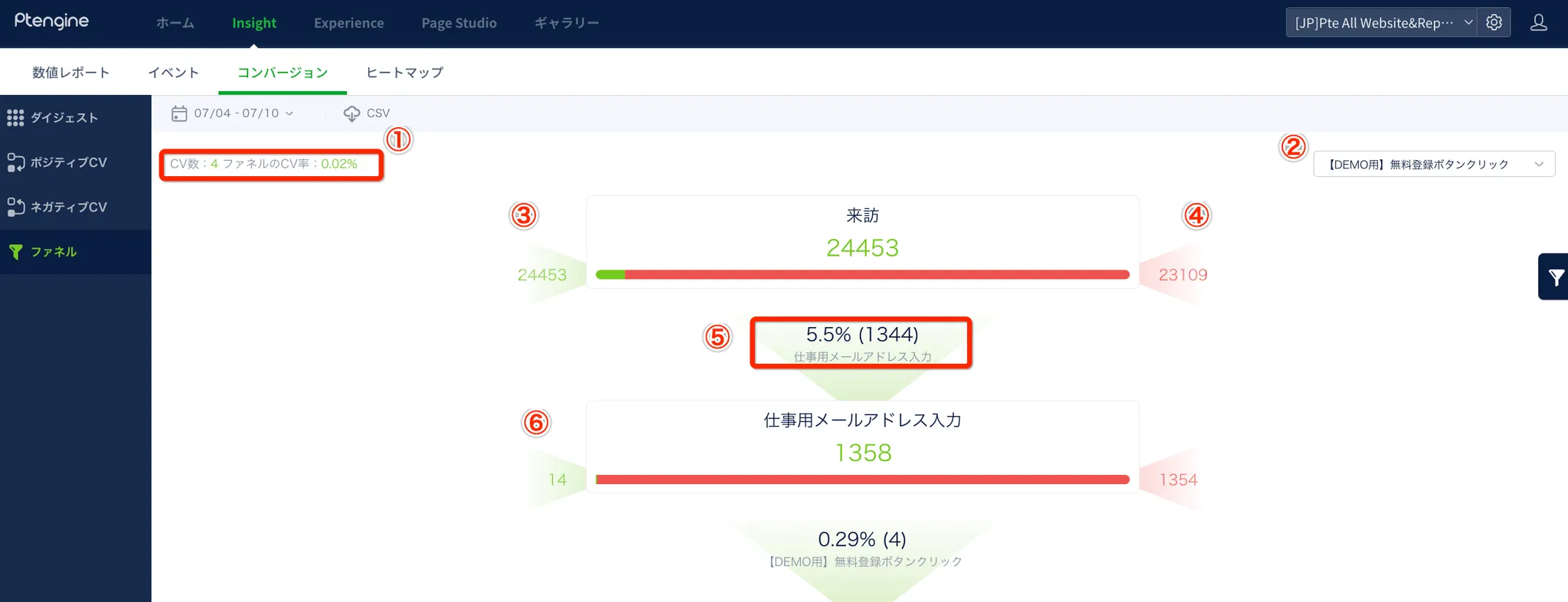 1. **CV数とCV率**: 最終ステップでのコンバージョン数と、ファネル全体のコンバージョン率(流入者数÷CV数)を表示
2. **ファネルリスト**: 設定済みのファネルを切り替えて表示
3. **初期流入数**: 最初のステップに流入したユーザー数
4. **離脱数**: 各ステップで次に進まずに離脱したユーザー数
* 🔍 数字をクリックすると、流入元や離脱先のページ情報を確認可能
1. **CV数とCV率**: 最終ステップでのコンバージョン数と、ファネル全体のコンバージョン率(流入者数÷CV数)を表示
2. **ファネルリスト**: 設定済みのファネルを切り替えて表示
3. **初期流入数**: 最初のステップに流入したユーザー数
4. **離脱数**: 各ステップで次に進まずに離脱したユーザー数
* 🔍 数字をクリックすると、流入元や離脱先のページ情報を確認可能
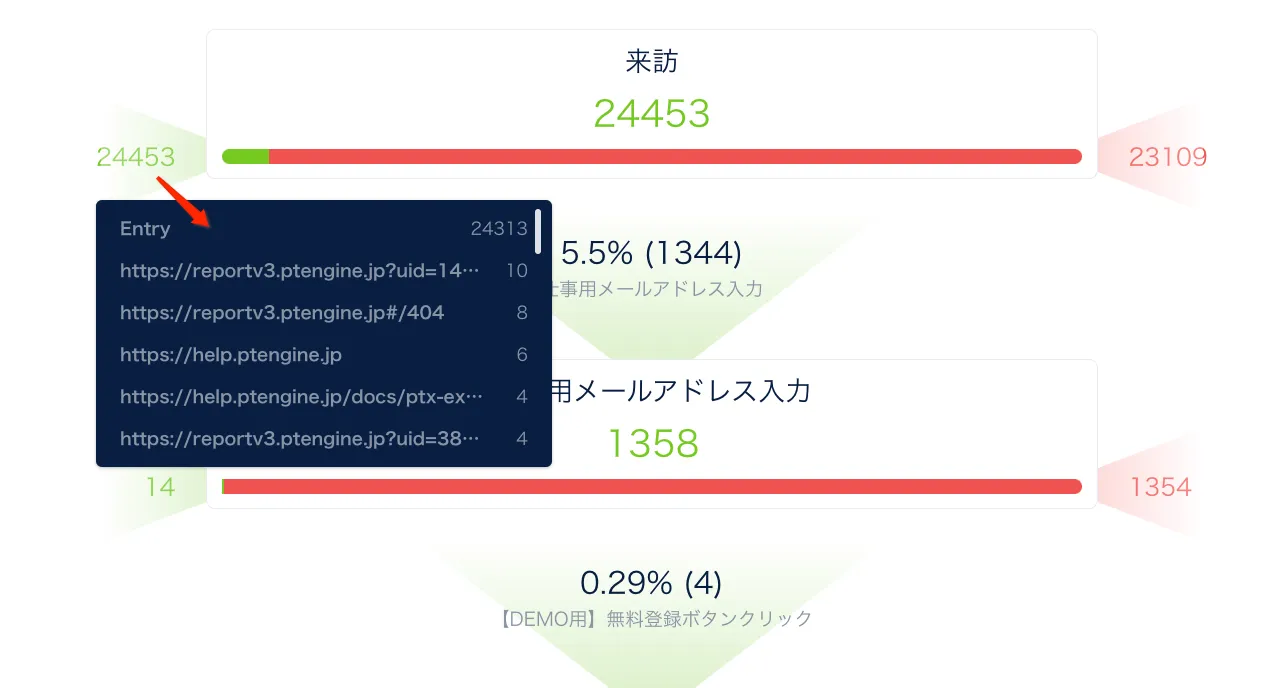 1. **進行数と比率**: 次のステップに進んだユーザー数とその割合
2. **直接流入数**: 前のステップを経由せずに直接流入したユーザー数
{% hint style="danger" %}
**注意**: ファネル分析を有効活用するためには、適切なステップ設定が重要です。
{% endhint %}
詳細な設定方法については、[設定動画](https://app.arcade.software/share/6jKl9fqSwo0Eyo1otZ46)をご参照ください。
ファネル分析を活用して、ユーザーの行動を深く理解し、サイトやアプリの改善につなげましょう。コンバージョン率の向上は、ビジネスの成長に直結します!
1. **進行数と比率**: 次のステップに進んだユーザー数とその割合
2. **直接流入数**: 前のステップを経由せずに直接流入したユーザー数
{% hint style="danger" %}
**注意**: ファネル分析を有効活用するためには、適切なステップ設定が重要です。
{% endhint %}
詳細な設定方法については、[設定動画](https://app.arcade.software/share/6jKl9fqSwo0Eyo1otZ46)をご参照ください。
ファネル分析を活用して、ユーザーの行動を深く理解し、サイトやアプリの改善につなげましょう。コンバージョン率の向上は、ビジネスの成長に直結します!