> For the complete documentation index, see [llms.txt](https://helps.ptengine.com/llms.txt). Markdown versions of documentation pages are available by appending `.md` to page URLs; this page is available as [Markdown](https://helps.ptengine.com/insight/setting/ip-exclusion.md).
# IP除外
{% hint style="success" %}
**IP除外とは**
IPアドレスまたはIP範囲を指定することで、特定のアクセスを計測対象から除外できます。
例えば、社内からのアクセスを除外したい場合に便利です。
設定を保存後、**約30分**で有効になります。
{% endhint %}
この機能は、InsightとExperienceの両方に適用されます。
また、 設定後のデータのみが反映されます。
## ⚙️ 設定方法
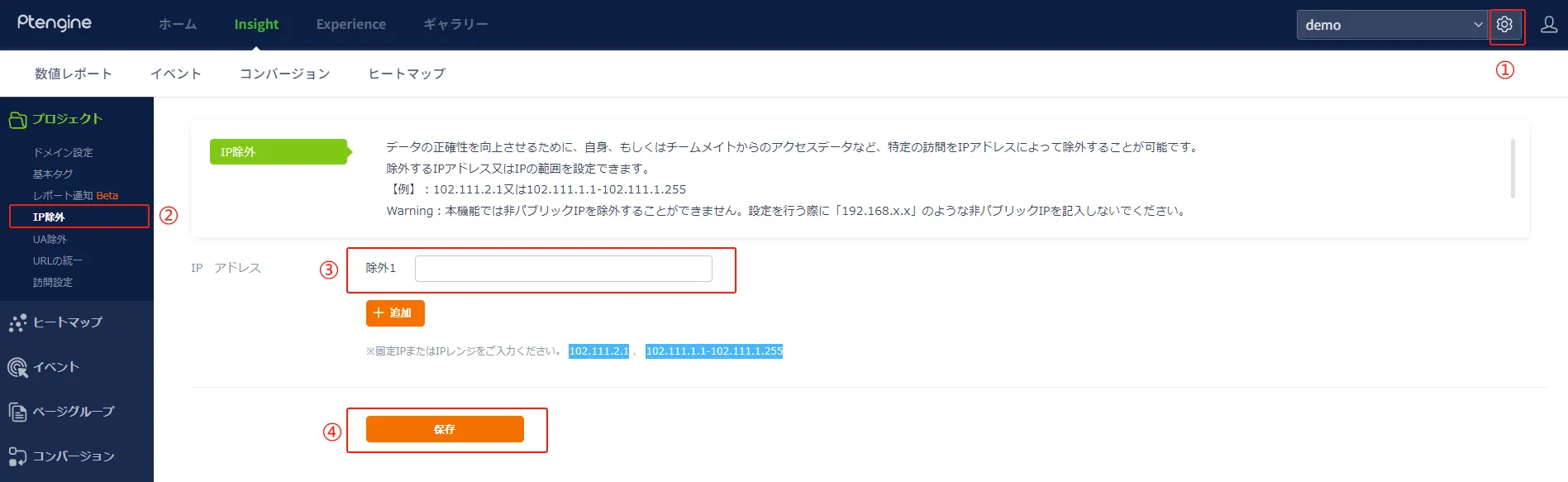 1. **基本設定にアクセス**
「基本設定」 >> 「プロジェクト」 >> 「IP除外」に移動します。
2. **IPアドレスを入力**
除外したいIPアドレスを入力し、保存してください。
3. **現在のIPアドレス確認**
現在使用しているIPアドレスは、以下のサイトで簡単に確認できます:
[IPアドレス確認サイト](https://www.ugtop.com/spill.shtml)
## 🎦操作動画
{% embed url="" %}
{% hint style="warning" %}
**注意事項**
この機能では、非パブリックIP(プライベートIP)を除外することはできません。設定する際には、192.168.x.xのような非パブリックIPを入力しないようにしてください。
{% endhint %}
1. **基本設定にアクセス**
「基本設定」 >> 「プロジェクト」 >> 「IP除外」に移動します。
2. **IPアドレスを入力**
除外したいIPアドレスを入力し、保存してください。
3. **現在のIPアドレス確認**
現在使用しているIPアドレスは、以下のサイトで簡単に確認できます:
[IPアドレス確認サイト](https://www.ugtop.com/spill.shtml)
## 🎦操作動画
{% embed url="" %}
{% hint style="warning" %}
**注意事項**
この機能では、非パブリックIP(プライベートIP)を除外することはできません。設定する際には、192.168.x.xのような非パブリックIPを入力しないようにしてください。
{% endhint %}