# スマートヒートマップ

{% hint style="info" %}
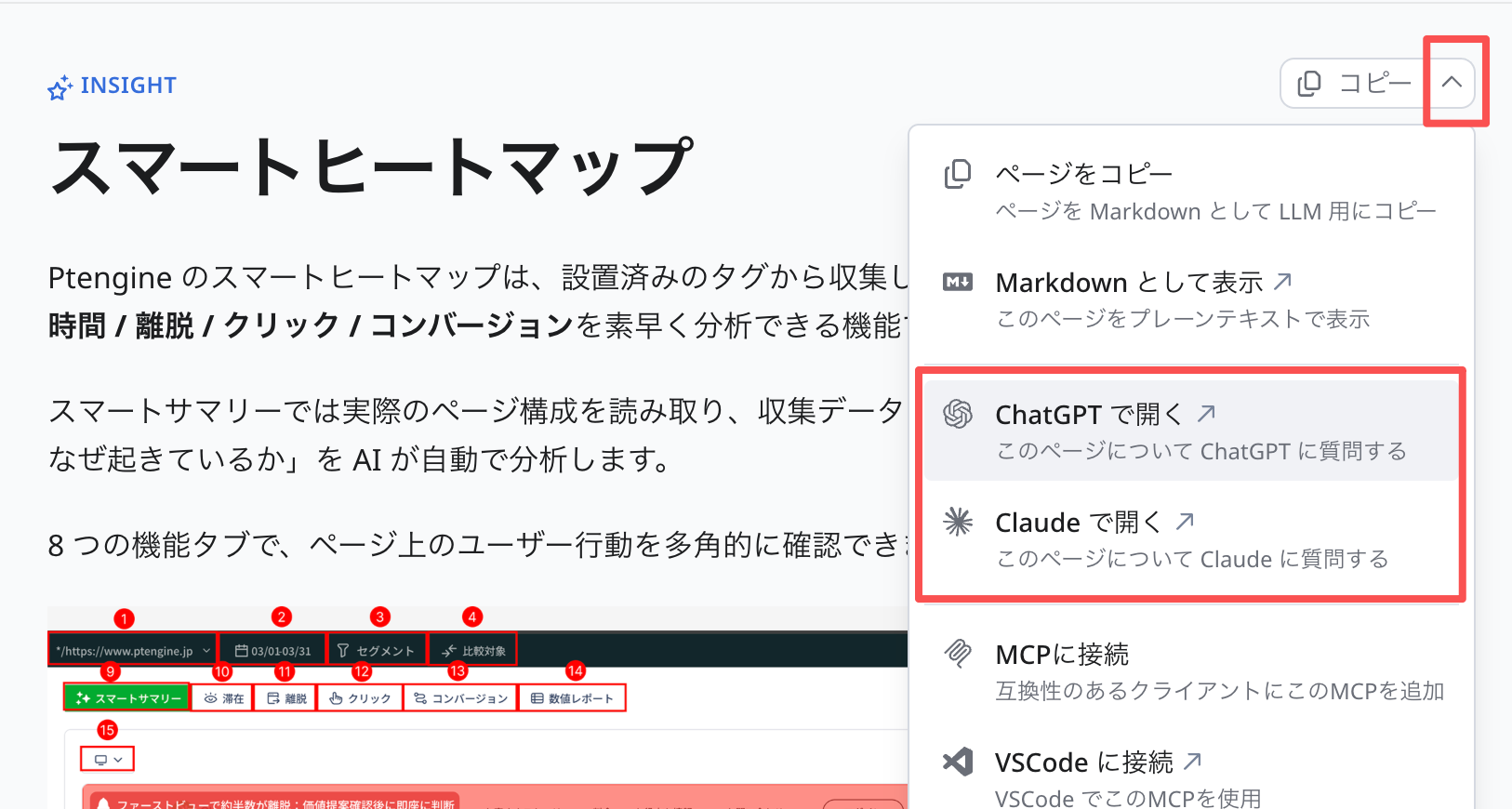
「内容が多くて、理解には時間がかかります。」

「専門用語多い、理解しづらい」

もしこのような悩みを持ちの方は、**タイトル右上のボタン**をぜひ活用してください！

AIが長い内容を説明していただけます！

<img src="/files/Dx2KX1Rq2kbkVSc5aGQc" alt="" data-size="original">
{% endhint %}

Ptengine のスマートヒートマップは、設置済みのタグから収集したデータをもとに、コンテンツへの**滞在時間 / 離脱 / クリック / コンバージョン**を素早く分析できる機能です。

スマートサマリーでは実際のページ構成を読み取り、収集データと組み合わせて、データの解釈と「それがなぜ起きているか」を AI が自動で分析します。

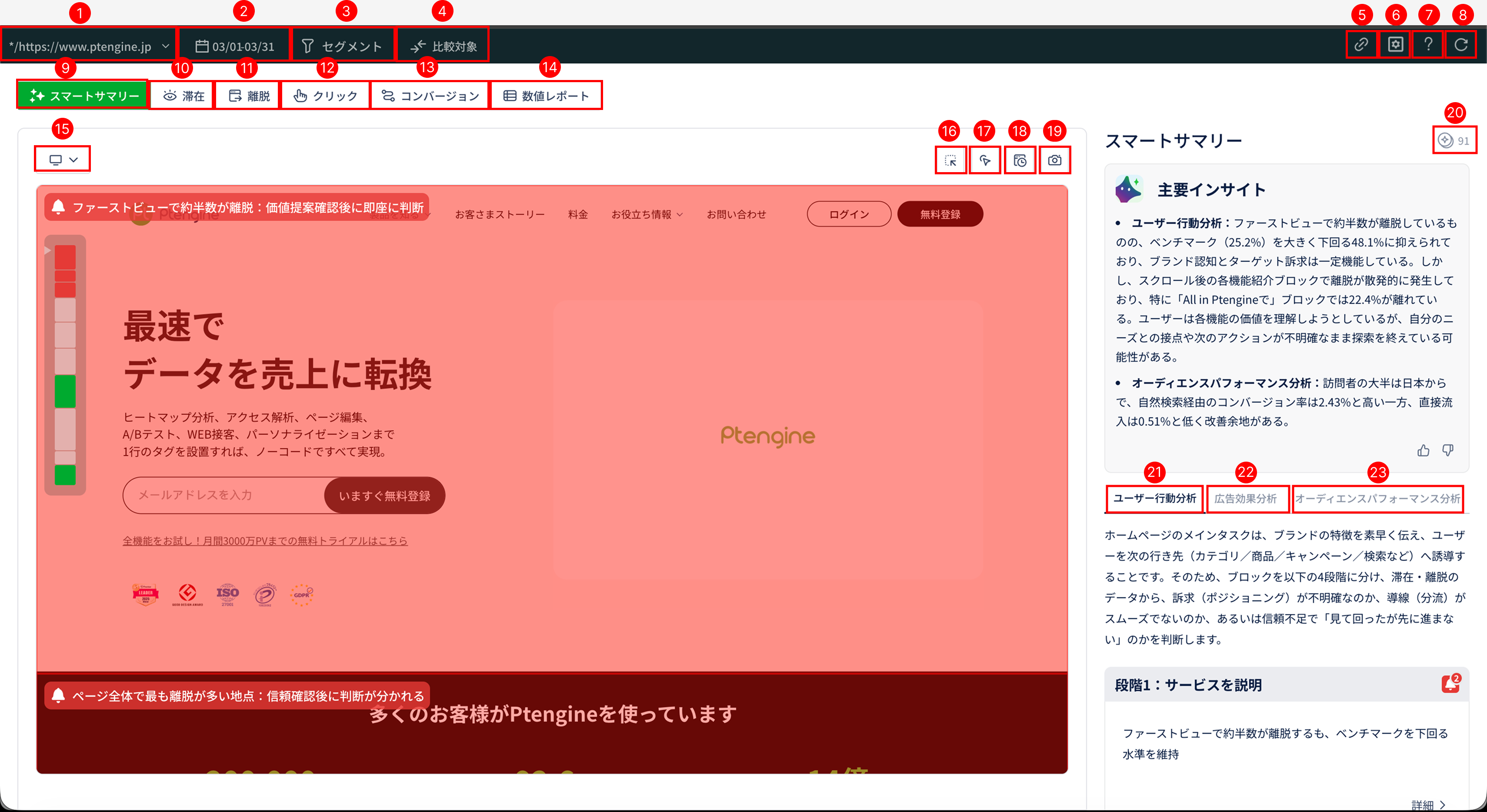
8 つの機能タブで、ページ上のユーザー行動を多角的に確認できます。

<figure><img src="/files/6r5YjSzP9l8HrGEBneTL" alt=""><figcaption><p>スマートヒートマップのツールバー全体（各機能の入口）</p></figcaption></figure>

***

## このツールで分かること（活用シーン）

| 知りたいこと                    | おすすめの機能                                                         |
| ------------------------- | --------------------------------------------------------------- |
| ページ全体の状況を素早くつかみたい         | [スマートサマリー](/insight/smart-heatmap/smart-summary.md)             |
| ユーザーがどこに注目しているか           | [滞在ヒートマップ](/insight/smart-heatmap/stay-heatmap.md)              |
| どこで離脱が起きているか              | [離脱ヒートマップ](/insight/smart-heatmap/exit-heatmap.md)              |
| どのボタンやリンクが押されているか         | [クリックヒートマップ](/insight/smart-heatmap/click-heatmap.md)           |
| どのコンテンツが成果に効いているか         | [コンバージョン貢献ヒートマップ](/insight/smart-heatmap/conversion-heatmap.md) |
| ページ・ブロック・要素の数値をまとめて見たい    | [数値レポート](/insight/smart-heatmap/numerical-report.md)            |
| 改修前後／セグメント別／複数視点を並べて比較したい | [比較ヒートマップ](/insight/smart-heatmap/comparison.md)                |
| ヒートマップ画像を社内資料にそのまま使いたい    | [スクリーンショット](/insight/smart-heatmap/screenshot.md)               |

***

## 8 つの機能タブ

| タブ                                                              | 種類      | 概要                                    |
| --------------------------------------------------------------- | ------- | ------------------------------------- |
| [スマートサマリー](/insight/smart-heatmap/smart-summary.md)             | AI 分析   | AI がページデータを分析し、ページ全体・ブロック単位のサマリーを自動生成 |
| [滞在ヒートマップ](/insight/smart-heatmap/stay-heatmap.md)              | ヒートマップ  | ブロックごとの滞在時間を可視化                       |
| [離脱ヒートマップ](/insight/smart-heatmap/exit-heatmap.md)              | ヒートマップ  | ブロックごとの離脱状況を可視化                       |
| [クリックヒートマップ](/insight/smart-heatmap/click-heatmap.md)           | ヒートマップ  | 要素ごとのクリック行動を可視化                       |
| [コンバージョン貢献ヒートマップ](/insight/smart-heatmap/conversion-heatmap.md) | ヒートマップ  | ブロック・要素ごとの CV 貢献度を評価                  |
| [数値レポート](/insight/smart-heatmap/numerical-report.md)            | データレポート | ページ・ブロック・要素のパフォーマンスを総合的にレポート化         |
| [比較ヒートマップ](/insight/smart-heatmap/comparison.md)                | 比較      | 複数のヒートマップを並べて比較                       |
| [ツールバー機能](/insight/smart-heatmap/toolbar.md)                    | 共通      | ページ切り替え・期間・セグメント・共有・ページ保存などの共通操作      |

***

## 始める前に — 設定の順番

スマートヒートマップの価値を最大限に引き出すには、以下の順番で設定するのがおすすめです。

```
① コンバージョン（CV）を設定
② ブロックを設定
③ 要素を設定
```

| 設定        | 設定すると                                            |
| --------- | ------------------------------------------------ |
| ① コンバージョン | コンバージョン貢献ヒートマップ・数値レポートでの CV 分析、スマートサマリーの分析精度が上がる |
| ② ブロック    | 滞在・離脱・コンバージョン貢献のブロック単位分析、スマートサマリーのブロック解釈ができる     |
| ③ 要素      | クリック・コンバージョン貢献の要素単位分析、CTA 設定が使える                 |

> **完璧を狙わず、まず一度設定してみるのがおすすめです。** 設定はあとからいつでも変更できます。

詳しい手順はこちら：

* [はじめに：3 つの設定順序](/insight/smart-heatmap/getting-started.md)
* [ブロック・要素の設定方法](/insight/smart-heatmap/block-element-settings.md)

***

## クラシック版・β 版から移行する方へ

旧ヒートマップ（クラシック版）や β 版で使っていた機能の現在地、計算方法の変更点、新機能のショートカットなどを対応表でまとめています。

→ [クラシック版・β 版からの変更点](/insight/smart-heatmap/migration-from-classic.md)

***

## 動的サイトへの対応

Ptengine は開発当初からダイナミックヒートマップ技術を採用しており、**動的なページにも対応する描画方式**を備えています。

ハンバーガーメニュー、メガメニュー、スライド、アコーディオンなどの動的コンテンツ、レスポンシブサイト、インタラクティブなデザイン、SPA など、さまざまなサイトに対応しています。

ツールバーの **画面操作モード** を使えば、タブやアコーディオンを開いた状態でもヒートマップを確認できます。詳しくは [ツールバー機能](https://helps.ptengine.com/insight/pages/V0kGYP5UgSSoGxITlE8W#画面操作モード) をご覧ください。

***

## 注意事項

以下のケースでは、ヒートマップが正しく取得できないことがあります：

* iframe を埋め込んでいるページ
* JavaScript で動的に ID が生成されるサイト
* ページの高さやコンテンツが頻繁に変わる場合
* 同一ページ内で ID 名が重複している場合

対処方法は [特殊ケース・トラブルシュート](/insight/smart-heatmap/special-cases.md) をご覧ください。

推奨ブラウザは Chrome / Microsoft Edge / Firefox です。Chrome 拡張機能の [Ptengine アシスタント](/start-guide/what-is-ptengine/ptengine-assistant.md) を入れておくと、互換性が高まります。


---

# Agent Instructions: Querying This Documentation

If you need additional information that is not directly available in this page, you can query the documentation dynamically by asking a question.

Perform an HTTP GET request on the current page URL with the `ask` query parameter:

```
GET https://helps.ptengine.com/insight/smart-heatmap.md?ask=<question>
```

The question should be specific, self-contained, and written in natural language.
The response will contain a direct answer to the question and relevant excerpts and sources from the documentation.

Use this mechanism when the answer is not explicitly present in the current page, you need clarification or additional context, or you want to retrieve related documentation sections.