> For the complete documentation index, see [llms.txt](https://helps.ptengine.com/llms.txt). Markdown versions of documentation pages are available by appending `.md` to page URLs; this page is available as [Markdown](https://helps.ptengine.com/start-guide/what-is-ptengine/ptengine-kit.md).
# Ptengine Kit
## Ptengine Kitとは
Ptengine Assistantの進化版、主にヒートマップの全画面キャプチャーを撮るための拡張機能です(開発元:Ptmind)。
{% hint style="success" %}
**なぜPtengine Assistantと統合しないか?**
Googleが拡張機能に対する制限が厳しくなったため、統合した状態でリリースできませんでした。
そのため、現在別々になっています。
{% endhint %}
## Ptengine Assistant と Ptengine Kitの比較
| Assistant | Kit |
| ---------------------------- | ---------------- |
| ヒートマップ、Inlineエディターの開くスピードを加速 | スクリーンショット |
| 素早くPtengineにログイン | 素早くPtengineにログイン |
| 簡単にヒートマップの確認 | 簡単にヒートマップの確認 |
## インストール方法
1. [Chromeウェブストア](https://chromewebstore.google.com/detail/ptengine-kit/aoaemnjgkappnciapncpgegedccejcdn?hl=ja)から拡張機能をインストールしてください
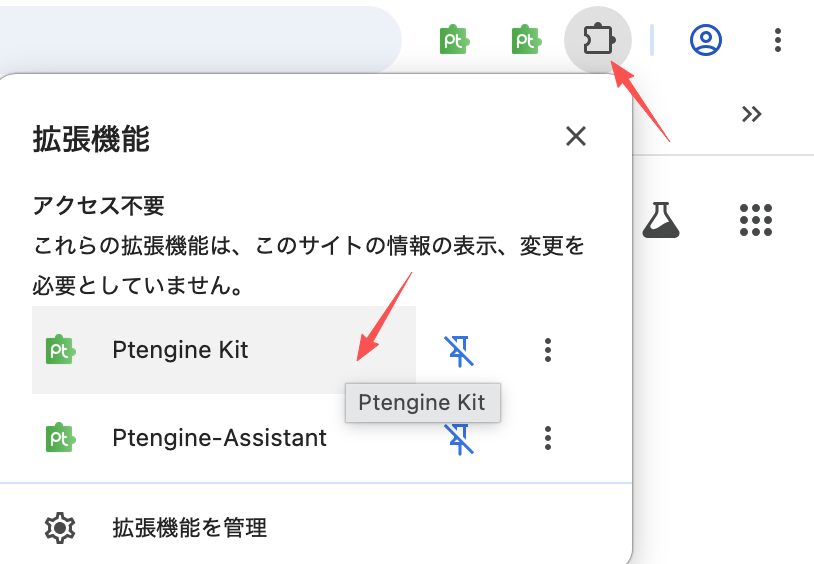
2. インストール完了後、画面右上の拡張機能アイコンをクリックし、ピンアイコンからPtengine Kitをブラウザに固定すると便利です
 {% hint style="info" %}
インストール完了後、Ptengineのページを更新してください。その後、Ptengine Kit拡張機能を使ってブラウザから直接ヒートマップをキャプチャすることもできます。
{% endhint %}
## 利用方法
1. Ptengineヒートマップ画面を開きます
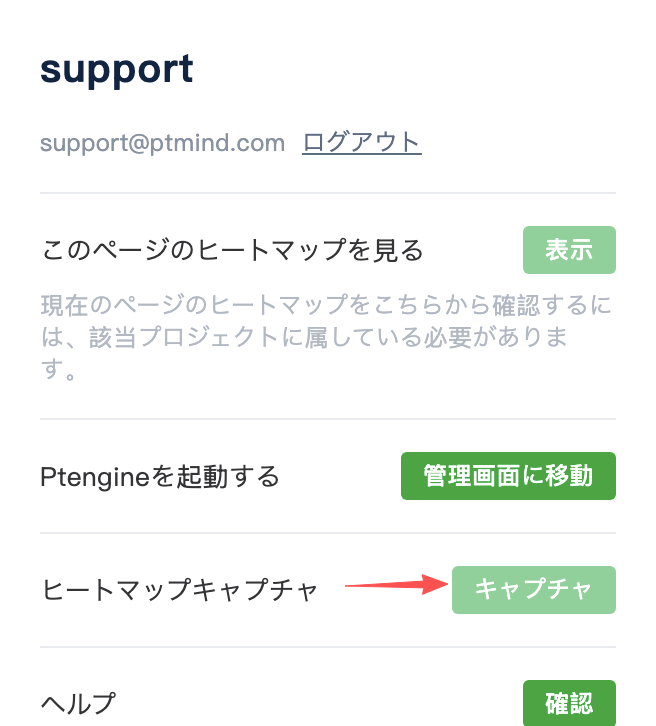
2. ツールバーのキャプチャボタンをクリックすると、Ptengine Kitが自動的にページ全体のヒートマップをキャプチャします
3. キャプチャが完了したらダウンロードできます
{% hint style="info" %}
インストール完了後、Ptengineのページを更新してください。その後、Ptengine Kit拡張機能を使ってブラウザから直接ヒートマップをキャプチャすることもできます。
{% endhint %}
## 利用方法
1. Ptengineヒートマップ画面を開きます
2. ツールバーのキャプチャボタンをクリックすると、Ptengine Kitが自動的にページ全体のヒートマップをキャプチャします
3. キャプチャが完了したらダウンロードできます
 関連ページ:[スクリーンショットの使い方](/insight/smart-heatmap/screenshot.md)